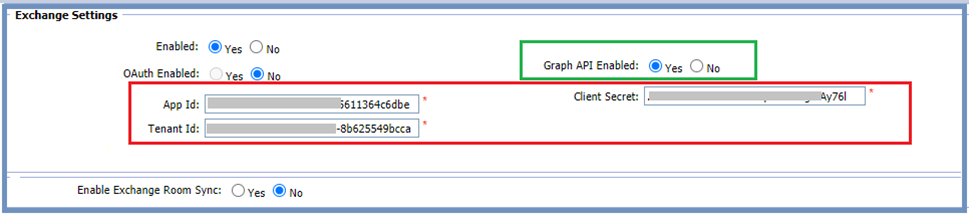
Exchange Settings Checklist
A checklist of what needs to be configured to enable either the Traditional Exchange Integration or the new Exchange Room Synchronization
Written By Ed Kinne
Last updated 4 months ago
Introduction
This is not a configuration guide. It is a checklist of what needs to be configured to enable either the Traditional Exchange Integration or the new Exchange Room Synchronization.
If you are looking for setup steps, please see Exchange Room Sync Configuration
This checklist is also available in a PDF document attached below
Exchange Settings Checklist - Oct 2025.pdf
506.5 KB• Document
Traditional Exchange Integration (Mode A)
This assumes current functionality, which involves using the Bookit plugin to create and manage bookings in Outlook. Any updates made in the web application are managed using EWS. It is now possible to use Graph API instead of EWS, but only when using Exchange Online.
Starting with Korbyt Booking version V6.6.1.0 it has been possible to enable EWS updates for the WebApp, which means that VCALS can be disabled from alerts, as we are able to use EWS to create the appointments for bookings created in the main web app.
Exchange Room Synchronization (Mode B)
This is a different mode of operation and involves mapping the Korbyt Booking rooms with a corresponding Exchange Room mailbox ID. This allows the Exchange (Outlook) user to create an appointment and book an Exchange Room directly, i.e., without needing to launch the plugin. This will automatically book the corresponding room in Korbyt Booking.
Types of Exchange Configuration / Authentication Options Available
These types for both modes of operation listed above
EWS On-premise (basic authentication only)
EWS Online with basic authentication
EWS online with OAuth
Graph API (online only)
The following pages review points to check for the different implementation options
Exchange Settings Required for Mode A
Exchange - EWS On-Premises
Points to check
Description | Installation Type | Responsible Party |
Service account information with relevant permissions |
| Client |
Local installation of Exchange | On-Premises | Client |
Standard Korbyt Booking Installation including Bookit, EWS Connector, Web Api, Exchange Calendar API & service | On-Premises | Client |
EWS Updates enabled for all UIs | Booking Settings | Korbyt |
Exchange Global Settings configured | Booking Settings | Korbyt |
Korbyt Bookit Plugin Installed | On-Premises | Client / Korbyt |
Alert invites (vcals/ics) turned off | Booking Settings | Client / Korbyt |
Exchange Calendar Service is running | Korbyt Booking | Korbyt |
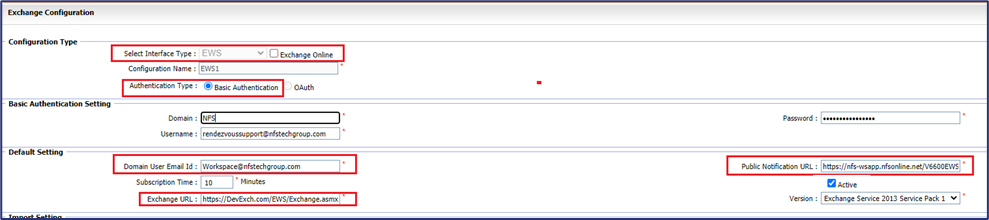
Exchange Global Settings
On-Premises Exchange with basic authentication
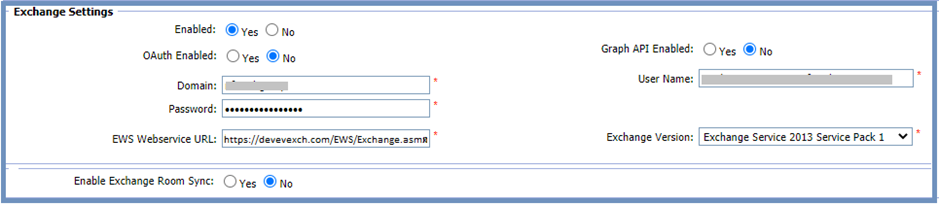
To enable EWS updates from the Web App

Exchange - EWS online with basic authentication
Points to check
Description | Installation Type | Responsible Party |
EWS Service account information with relevant permissions |
| Client |
Standard Korbyt Booking Installation incl. QB,API, EWS, Exch etc | On-Premises | Korbyt |
EWS Updates enabled for all UIs | Booking Settings | Korbyt |
Exchange Global Settings configured | Booking Settings | Korbyt |
Korbyt Bookit Plugin Installed | On-Premises | Client / Korbyt |
Alert invites (vcals/ics) turned off | Booking Settings | Client / Korbyt |
Exchange Calendar Service is running | Korbyt Booking | Korbyt |
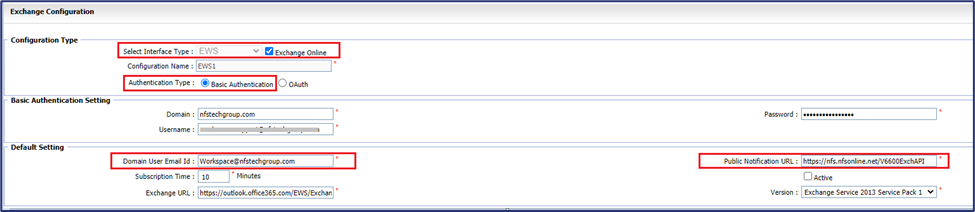
Global settings are similar to On-premises settings above, but the web service URL and service account credentials are different:
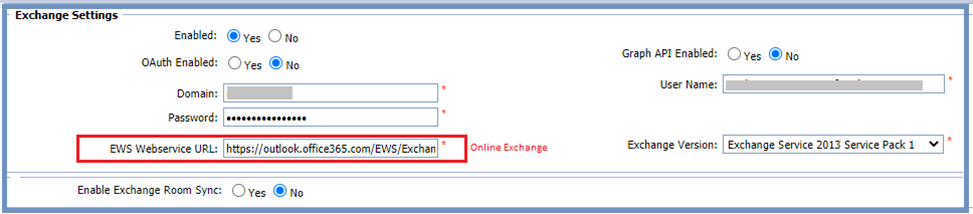
Exchange - EWS online with OAuth
Points to check
Description | Installation Type | Responsible Party |
Azure App Registration with correct API permissions |
| Client |
Standard Korbyt Booking Installation | On Premise | Korbyt |
EWS Updates enabled for all UIs | Korbyt Booking | Korbyt |
Exchange Global Settings configured | Korbyt Booking | Korbyt |
Korbyt Bookit Plugin installed | On Premise | Client / Korbyt |
Alert invites (vcals/ics) turned off | Korbyt Booking | Client / Korbyt |
Exchange Calendar Service is running |
| Korbyt |
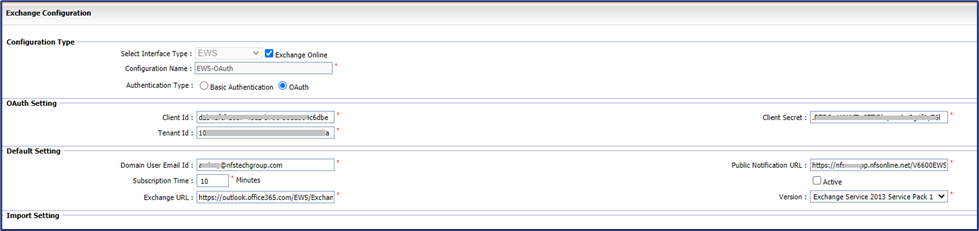
Global Settings: App Id, Tenant Id, and Client Secret obtained from the Azure App Registration
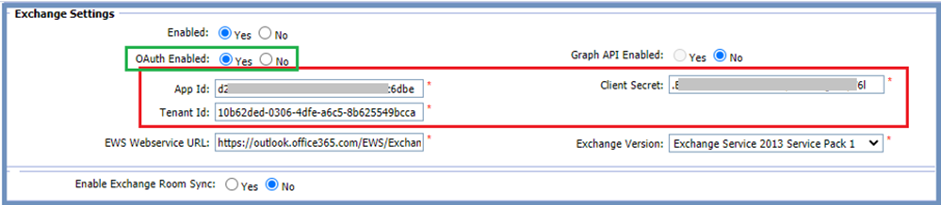
Exchange - Online using Graph API
Points to check
Description | Installation Type | Responsible Party |
Azure App Registration with correct API permissions |
| Client |
Standard Korbyt Booking Installation | On Premise | Korbyt |
EWS Updates enabled for all UIs | Booking Settings | Korbyt |
Exchange Global Settings configured | Booking Settings | Korbyt |
Korbyt Bookit Plugin installed | On Premise | Client / Korbyt |
Alert invites (vcals/ics) turned off | Booking Settings | Client / Korbyt |
Exchange Calendar Service is running | Korbyt Booking | Korbyt |
Global Settings for Graph API

Exchange Settings Required for Mode B
Exchange Rooms - EWS On-Premises
Points to check
Description | Installation Type | Responsible Party |
Service account information with relevant permissions |
| Client |
Local installation of Exchange | On Premise | Client |
Standard Korbyt Booking Installation | On Premise | Korbyt |
Exchange Sync API folder configured | On Premise | Korbyt |
Exchange Sync Service installed | On Premise | Korbyt |
EWS Updates enabled for all UIs | Booking Settings | Korbyt |
Exchange Global Settings – enabled but not used | Booking Settings | Korbyt |
Exchange Room Sync Global Settings configured | Booking Settings | Korbyt |
No Plugin necessary | On Premise | Client / Korbyt |
Alert invites (vcals/ics) turned off | Booking Settings | Client / Korbyt |
Set Enabled to Yes, even though the actual settings in that section are not used when Exchange Room Sync is enabled.

Exchange Roomos - EWS online with basic authentication
Points to check
Description | Installation Type | Responsible Party |
Service account information with relevant permissions |
| Client |
Standard Korbyt Booking Installation | On Premise | Korbyt |
Exchange Sync API folder configured | On Premise | Korbyt |
Exchange Sync Service installed | On Premise | Korbyt |
EWS Updates enabled for all UIs | Booking Settings | Korbyt |
Exchange Global Settings - enabled but not used | Booking Settings | Korbyt |
Exchange Rooms Sync Global Settings – see below | Booking Settings | Korbyt |
No Plugin necessary, but required for services/addons | On Premise | Client / Korbyt |
Alert invites turned off | Booking Settings | Client / Korbyt |

Exchange Rooms - EWS online with OAuth
Points to check
Description | Installation Type | Responsible Party |
Azure App Registration with correct API permissions |
| Client |
Standard Korbyt Booking Installation | On Premise | Korbyt |
Exchange Sync API folder configured | On Premise | Korbyt |
Exchange Sync Service installed | On Premise | Korbyt |
EWS Updates enabled for all UIs | Booking Settings | Korbyt |
Exchange Global Settings – enable, but not used | Booking Settings | Korbyt |
Exchange Room Sync Global Settings – see below | Booking Settings | Korbyt |
No Plugins installed | On Premise | Client / Korbyt |
Alert invites turned off | Booking Settings | Client / Korbyt |

Exchange Rooms - Using Graph API
Points to check

Description | Installation Type | Responsible Party |
Azure App Registration with correct API permissions |
| Client |
Standard Korbyt Booking Installation | On Premise | Korbyt |
Exchange Sync API folder configured | On Premise | Korbyt |
Exchange Sync Service installed | On Premise | Korbyt |
EWS Updates enabled for all UIs | Booking Settings | Korbyt |
Exchange Global Settings are enabled but not used | Booking Settings | Korbyt |
Exchange Room Sync Settings – as shown below | Booking Settings | Korbyt |
No Plugins installed | On Premise | Client / Korbyt |
Alert invites turned off | Booking Settings | Client / Korbyt |