August 28th, 2026
Signage
Screen Detective: Catch blank or frozen screens before your audience does

Released at the beginning of the month - Screen Detective is a new monitoring feature that continuously analyzes player screenshots to detect frozen or blank screens. When it spots a problem, it can alert your team and attempt automated recovery steps, often before a viewer or employee ever notices something went wrong.
With Screen Detective, you can:
Get proactive alerts the moment a screen freezes or goes blank
Let Korbyt attempt automated recovery steps on affected players (optional)
Review a dashboard of open and resolved issues, screenshot history, and recovery timelines for every monitored player
Requires the Screen Detective subscription add-on and the newer Navbar navigation. Available for KDA, KWP, BrightSign and other devices with screenshot capability.
Learn more: https://product.korbyt.com/en/help/articles/8007905-screen-detective
Canva Integration: Design in Canva, publish straight to Korbyt

Released at the end of June - Content creators can now build images and videos directly in Canva and publish them straight into their Korbyt tenant using the new Korbyt app inside Canva, no exporting a file and re-uploading it by hand.
With the Canva integration, you can:
Publish Canva designs to your Korbyt Tenant in a couple of clicks, right from Canva's Share menu
Skip the export, download, and upload cycle entirely
Connect your Korbyt account once and reuse it for future designs
Learn more: https://product.korbyt.com/en/help/articles/1953312-canva-publishing-to-korbyt-through-the-share-app
Release Recap We're constantly working to improve Korbyt. Here's what we were up to:
Squashed Bugs
Office 365 Calendar data adapters: Corrected an issue causing reauthentication failures
Player endpoint: Resolved an issue where the player API returned different results than the CMS
Player Index: Fixed inaccurate status display on the Player Index page
HLS streaming: Resolved an issue preventing HLS video streams from rendering in Layouts
Folder View: Corrected a Folder View issue where certain Player Groups were missing Edit and Delete options
SSO Management: Fixed a display issue where imported users were not reflected correctly on the CMS Users list
Dynamic Player Groups: Resolved an issue where rules based on state abbreviation did not match correctly
Sony Bravia: Fixed an issue preventing Sony Bravia remote commands from executing
OnTarget Stock element: Corrected vertical alignment settings that were not applying
Audiences: Resolved an issue where user Audience membership would intermittently disappear
Locations: Fixed an issue where devices located in Alaska would revert to Alabama after updates
Under the Hood
The Office 365 Calendar adapter reauthentication fix is live on ECS-hosted environments. Tenants still migrating to ECS will receive it as part of that transition.
We love hearing from you! If you have feedback or ideas, please use our feedback portal.
Need more info? Visit our Help Center for guides and resources.
The Korbyt Product Team
August 21st, 2026
Signage
Screen Detective: Catch dead screens before your audience does
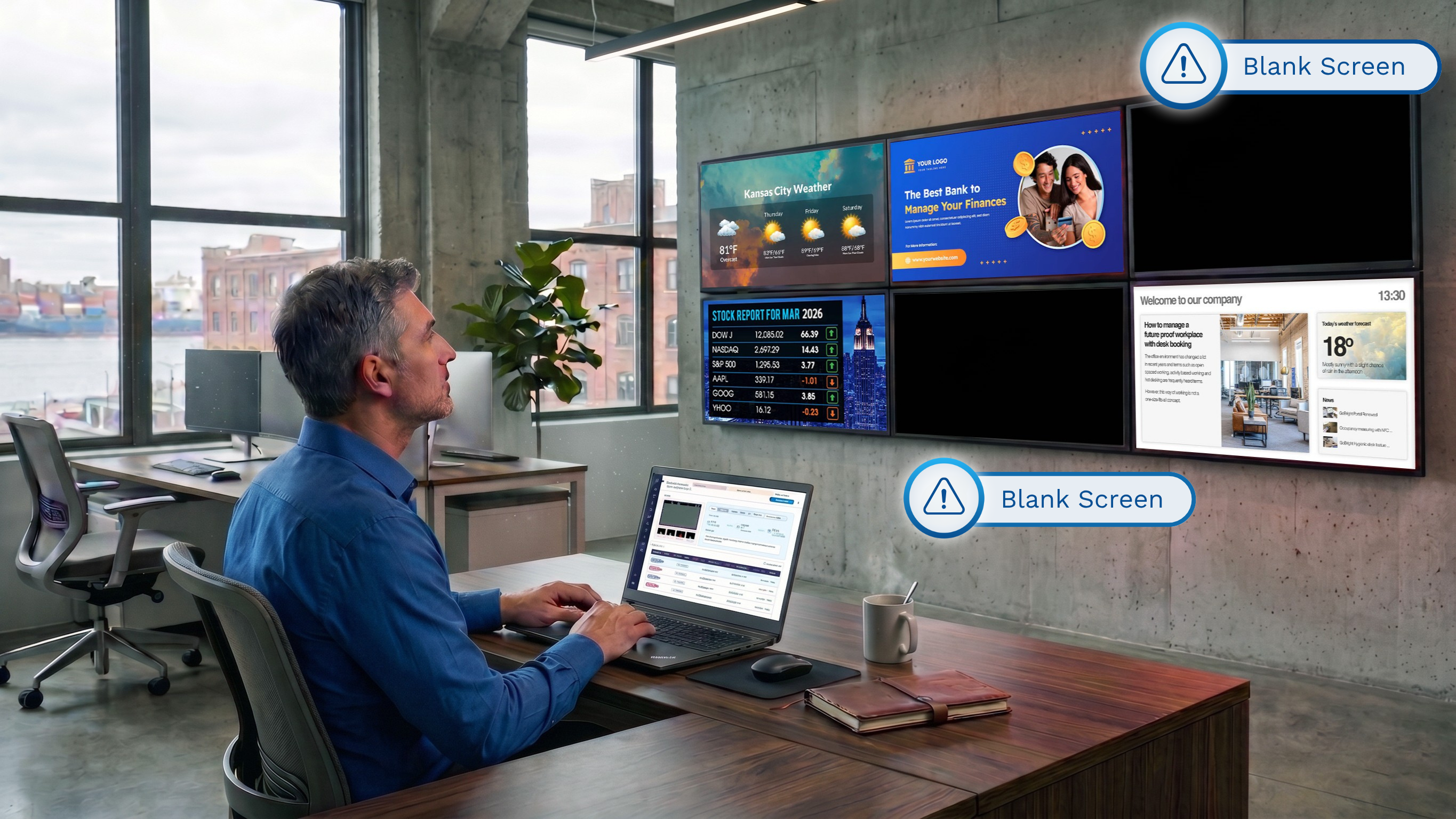
Screen Detective is a new monitoring feature that continuously analyzes player screenshots to detect frozen or blank screens. When it spots a problem, it can alert your team and attempt automated recovery steps, often before a viewer or employee ever notices something went wrong.
With Screen Detective, you can:
Get proactive alerts the moment a screen freezes or goes blank
Let Korbyt attempt automated recovery steps on affected players (optional)
Review a dashboard of open and resolved issues, screenshot history, and recovery timelines for every monitored player
Requires the Screen Detective subscription add-on and the newer Navbar navigation. Available for KDA, KWP, BrightSign and other devices with screenshot capability.
Learn more: https://product.korbyt.com/en/help/articles/8007905-screen-detective
Canva Integration: Design in Canva, publish straight to Korbyt

Content creators can now build images and videos directly in Canva and publish them straight into their Korbyt tenant using the new Korbyt app inside Canva, no exporting a file and re-uploading it by hand.
With the Canva integration, you can:
Publish Canva designs to your Korbyt Tenant in a couple of clicks, right from Canva's Share menu
Skip the export, download, and upload cycle entirely
Connect your Korbyt account once and reuse it for future designs
Learn more: https://product.korbyt.com/en/help/articles/1953312-canva-publishing-to-korbyt-through-the-share-app
Release Recap We're constantly working to improve Korbyt. Here's what we were up to:
Squashed Bugs
Office 365 Calendar data adapters: Corrected an issue causing reauthentication failures
Player endpoint: Resolved an issue where the player API returned different results than the CMS
Player Index: Fixed inaccurate status display on the Player Index page
HLS streaming: Resolved an issue preventing HLS video streams from rendering in Layouts
Folder View: Corrected a Folder View issue where certain Player Groups were missing Edit and Delete options
SSO Management: Fixed a display issue where imported users were not reflected correctly on the CMS Users list
Dynamic Player Groups: Resolved an issue where rules based on state abbreviation did not match correctly
Sony Bravia: Fixed an issue preventing Sony Bravia remote commands from executing
OnTarget Stock element: Corrected vertical alignment settings that were not applying
Audiences: Resolved an issue where user Audience membership would intermittently disappear
Locations: Fixed an issue where devices located in Alaska would revert to Alabama after updates
Under the Hood
The Office 365 Calendar adapter reauthentication fix is live on ECS-hosted environments. Tenants still migrating to ECS will receive it as part of that transition.
We love hearing from you! If you have feedback or ideas, please use our feedback portal.
Need more info? Visit our Help Center for guides and resources.
The Korbyt Product Team
June 16th, 2026
Booking
May 21st, 2026
Mobile Booking
Booking
What's New?
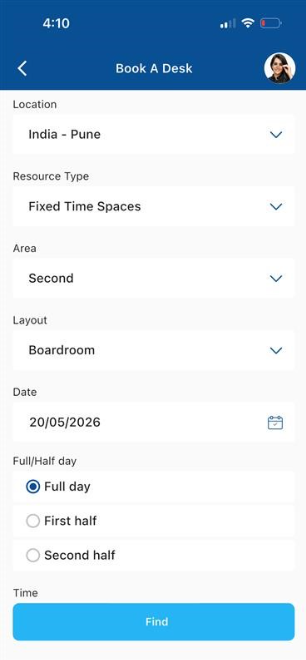
New 'Allow Book for Someone Else' Setting for the Mobile App
A new Allow Book for Someone Else setting has been added under Global Settings → Mobile, letting administrators control whether the Book-for-Someone-Else option is visible to users in the Mobile App. The setting is ‘Yes’ by default, preserving current behavior, switching it to ‘No’ hides the option entirely from the Mobile App.
May 19th, 2026
Booking
What’s New?
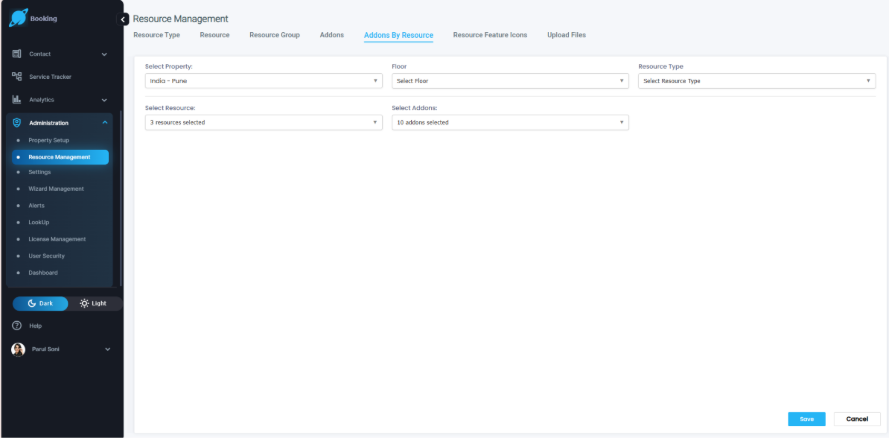
Bulk Resource Add-on Configuration
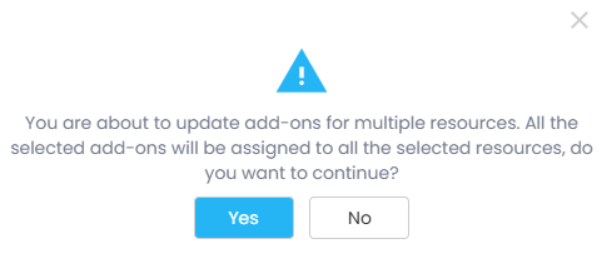
Admins can now apply add-ons to multiple resources in a single action instead of repeating the same configuration for each resource. The Resource Add-on Configuration screen has two new multi-select fields, Floor and Resource Type, that cascade from the selected Location and narrow which resources are listed; the Resource picker is also multi-select. A live count of selected resources and add-ons appears alongside each Select All control, and clicking Save shows a confirmation pop-up before applying the chosen add-ons to every selected resource at once.
Auto-Calculate Total Participants from Per-Room Counts
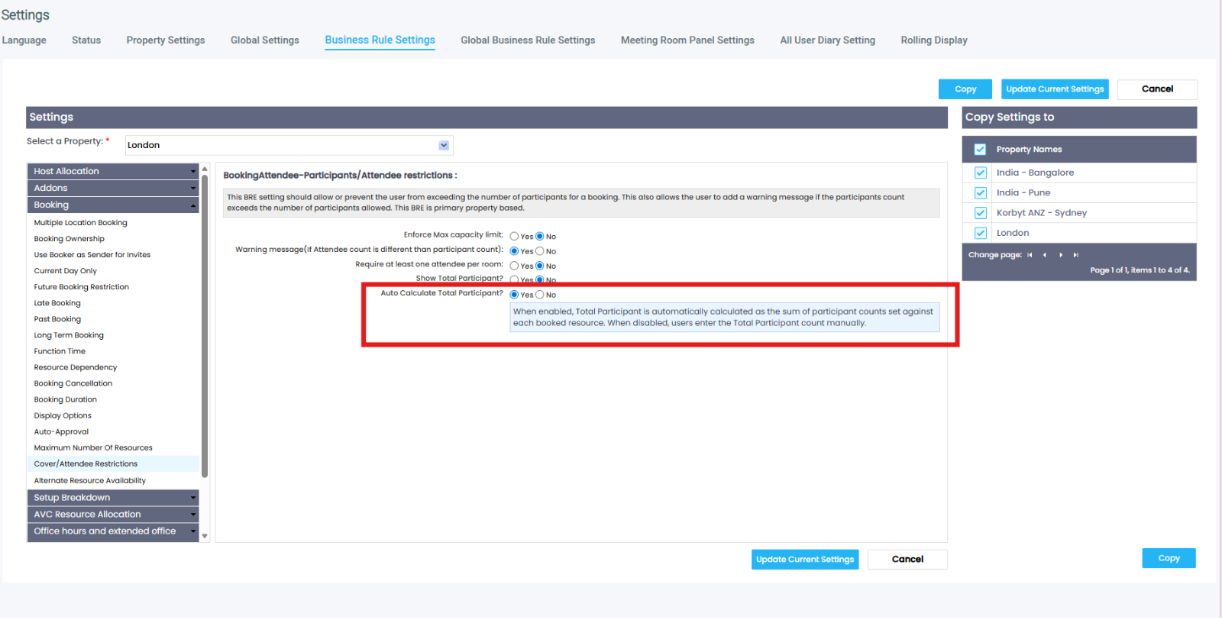
A new Business Rule setting, ‘Auto Calculate Total Participant’, gives administrators control over how the Total Participants field is populated on a booking. When the setting is Yes (the default), the field is read-only and equals the sum of the Resource participant counts entered for each booked room. It updates LIVE as spaces are added, removed, replaced, or have their Resource participant counts changed. When the setting is No, the field stays manually editable and is unaffected by changes to Resource participant counts. The behaviour applies to bookings created through Korbyt Booking and Bookit.
What Admins Need to Do
The setting is located under Administration → Settings → Business Rule Settings → Booking → Cover/Attendee Restrictions, directly beneath the Show Total Participant setting. The default value is Yes. The setting is property-based: on Korbyt Booking it follows the booking's primary property, and in Bookit it follows the logged-in user's primary property.
O365 Add-in | List and Floor Plan View Refresh
The List and Floor Plan views in the O365 Add-in have been updated with a refreshed visual design. Resource cards now display Attendee and Resource Type icons, replacing the legacy Floor label with cleaner iconography. Room and Desk resource types are distinguished by dedicated icons, making space types immediately recognizable at a glance. The Floor icon has been updated with a new highlighted treatment, and the Attendee icon in the header carries a revised color style consistent with the updated design language.

API: Update the Non-Exchange User Flag on a User Profile
A new API endpoint lets administrators and integration developers update the Non-Exchange User flag on a user's profile without opening the Korbyt Booking admin UI for each user. The endpoint supports both single-user and bulk updates. The change is reflected immediately under Administration → User Security → User and is recorded in the system audit trail along with the timestamp and caller identity.
Additional Enhancements
Multiple Resource Images throughout Bookit
Resources with multiple images now displayed as a carousel in Bookit across Resource Search, the Booking Form, My Bookings, and the Bookit Floorplan. Users can navigate images using left and right arrows.
Azure AD User Sync | Improved Handling of User Import
Resolved an issue where certain users were not being imported into Korbyt Booking during an Azure AD / Entra ID sync. This affected environments where user accounts are managed directly in the cloud without synchronization from an on-premises Active Directory. Affected users will now import successfully without any manual intervention required.
Release Fixes and Changes
May 15th, 2026
Signage
Playlist Priority Scheduling: Interrupt and Override | Take full control of what plays and when
When something urgent needs to go on screen immediately, you shouldn't have to fight your own playlist to get it there. Playlist Priority Scheduling lets you assign priority levels across your content so that high-urgency material - emergency alerts, executive communications, compliance notices - automatically interrupts lower-priority playback and takes over the display. When the priority event ends, your standard schedule resumes on its own, with no manual intervention required.
With enhancements to Playlist Priority Scheduling, you can:
Define priority tiers across playlists so critical content always wins
Configure interrupt and override rules that activate the moment high-priority content is triggered
Return to standard scheduled content automatically once the priority event completes
Learn more: https://product.korbyt.com/help/articles/1566009-playlist-priority-scheduling-interrupt-and-override
Release Recap We're constantly working to improve Korbyt. Here's what we were up to:
New & Enhanced
Sony Bravia Provisioning and API Integration: Provision and manage Sony Bravia displays directly through Korbyt, with full API integration for streamlined device setup and control.
Amazon Signage Stick Integration: Provision Amazon Signage Sticks using the Device Serial Number (DSN) as the provisioning token, simplifying large-scale deployments.
Schedule Group Cache Clearing: Clear the cache across an entire player group in a single action, making it easier to resolve content refresh issues at scale without touching each device individually.
Crestron Startup Diagnostics: Korbyt now logs the PWA provisioning token, origin, and fallback resolution at startup on Crestron players, giving support teams the context they need to diagnose provisioning issues faster.
Secrets API for API Key Management: A new API enables programmatic creation and deletion of API keys used to manage secrets, supporting automated credential rotation workflows without manual admin intervention.
Korbyt Capture: Local Time Zone Support: Screenshot browser tasks in Korbyt Capture now execute against the player's local time zone, ensuring scheduled captures reflect the correct local time rather than a default server clock.
Korbyt Keychain for Power BI Credentials: Migrate Power BI layouts to use a shared Keychain entry so credential rotations require a single update instead of changes across every individual layout.
PWA Audio Volume Control: Administrators can now adjust the audio volume directly on Korbyt Signage PWA players, including the ability to fully mute a player and have that setting persist.
We love hearing from you! If you have feedback or ideas, please use our feedback portal.
Need more info? Visit our Help Center for guides and resources.
The Korbyt Product Team
April 21st, 2026
Booking
What’s New?
Book by Floor Plan in Korbyt Booking
Floor Plan Booking is now available directly in Korbyt Booking. Users no longer need to switch applications to take advantage of their organization's configured floor plans. The entire booking journey, from browsing a visual layout to confirming a space with services and chargeback, is now available in one place.
Floor Plan Navigation in the Left Menu
A dedicated Floor Plan entry now appears in the left navigation of Korbyt Booking. Users can access it directly, without needing to go through the standard new booking flow first. This improves discoverability and reduces clicks.

Interactive Visual Layout
Once inside, users see a fully interactive rendering of their primary location's floor plan, the same one configured by their admin. Rooms and desks are pinned to their real positions on the floor. Green indicators show available spaces. Users can zoom in, navigate by floor, and see exactly what's around them before they commit to a space.

End-to-End Booking Flow from the Floor Plan
Selecting a space from the floor plan launches the complete booking journey, the same flow users already know. This includes:
Adding attendee details
Adding services and catering requirements
Applying chargeback and booking type logic
Booking rules, authorization prompts, and error handling
Booking confirmation with email notifications to relevant parties
No features are left behind. If a user selects a space that requires authorization, the appropriate prompts still appear. Booking rules and restrictions remain in force.
What Admins Need to Do
The feature is enabled by default for all users with the appropriate permissions. If you'd like to restrict access, it can be switched off under Administration → Global Settings → Default Settings →Uncheck ‘Enable Floorplan’.
Add-ons Preserved When Editing Booking Time Within Cut-off
A new feature flag → Preserve Add-ons Within Cut-off has been introduced under BRE Settings → Addons → Addons. It is off by default.
When enabled, add-ons are preserved when the booking time is changed on the same date and the booking remains within the cut-off period. Any change to the date, even if the new date still falls within the cut-off period, follows existing production behavior. If no changes are made to date, time, resources, or attendees, add-ons are unaffected regardless of the flag setting.
Cut-off popup behavior by flag state:
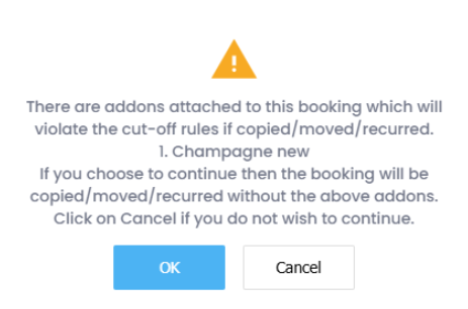
Preserve Add-ons Enabled: Add-ons are retained only for same-date, time changes within the cut-off period. All other edits within cut-off show a popup informing the user and drop add-ons on confirmation.
Preserve Add-ons Disabled: A popup always appears informing the user and drop add-ons on confirmation, when a booking is moved within the cut-off period, whether the date or time has changed.
New User Group Settings Introduced
Restrict Modification of Date & Time
Added under User Groups → Entity Property Based → Modify Booking.
This setting is unchecked by default, and when enabled, users in the group cannot change the date or time of other users' bookings. Users retain the ability to edit date and time only on bookings where they are the Organizer.
Restrict Add/Delete of Attendees
Added under User Groups → Entity Property Based → Show Attendees tab.
This setting is unchecked by default and can only be enabled when both ‘Modify Bookings’ and ‘Show Attendees tab’ are checked. If either of those settings is unchecked, this setting cannot be selected and displays a no-entry icon on hover. When enabled, users in the group can view and edit attendees on other users' bookings but cannot add or remove them.
Note: These settings address a specific access control concern. When bookings are linked to a user's Exchange calendar, admins with modification rights inherently gain delegate access over that user's calendar. These controls allow tenants to scope that access more precisely without removing modification permissions entirely.
Global Add-ons: Participant Count and Pricing Improvements
Participant Count Preserved
Switching to a Global Add-on resource type during booking no longer resets the Participant Count to 1. The count is retained per line item, and different add-ons can carry different participant counts independently.
Add-on quantities now default based on configuration — Unit-type add-ons default to 1, Participants-type add-ons default to the entered participant count. Resource covers in the Booking Summary and Service Tracker update accordingly on save, eliminating the previous mismatch between the two.
New Total Column
A Total column: calculated as Participants × Rate, has been added to the Resources grid. It updates in real time as values change and is display-only. For hourly-priced spaces, the Total adjusts proportionally to the booking duration.
A new Display Total Price on Booking Summary setting is available under Property Settings in Global Settings, enabled automatically when Display Room Price on Booking Summary is turned on.
Additional Enhancements
Multiple Images for Resources
Admins can now upload up to 5 images per resource in Korbyt Booking. Images appear as thumbnails in the resource configuration and display across the Outlook Add-in list view, Floor Plan view & Resource Details in Korbyt Booking.
Outlook Add-in Honors Selected Room Layout
The Outlook Add-in now carries the room layout selected during search through to the created booking. Previously, bookings defaulted to the room's default layout regardless of what was selected in the preference.
Organizer Field Locked in Bookit Edit Mode
When editing a booking in Bookit, the Organizer field is now read-only. The Organizer reflects the Exchange calendar against which the booking was made, and since Outlook does not permit changes to this after creation, Bookit now enforces the same restriction.
Custom Recurrence Pattern Hidden for Exchange Spaces
Custom recurrence option is now hidden for Exchange spaces in Korbyt Booking, replacing the previous behavior where it was visible but blocked with a no-entry icon. This applies across both Create and Edit Series journeys, and takes effect whenever Impersonate Outlook for Recurring Bookings is set to Yes.
Booking Title No Longer Truncated on Diary and Booking Screens
Long booking titles are now displayed in full across the diary, and all associated Booking Details and Booking Summary screens. On the diary, hovering over a booking shows the complete title in a tooltip regardless of length, across the Daily, Weekly, Monthly, and All User diary views.Bookit: Add Button and Quantity Selector Alignment Fix
The quantity selector and Add button in the Services section are now consistently aligned on the same horizontal line, with the Add button positioned immediately to the right of the quantity selector, and both elements right aligned within the service row. This applies to both the Add Services and Edit Services flows, which are now visually consistent with each other.A copy icon will be added to the 'Host' field in Booking Summary screen.
Booking notes pop up window can now be maximized.
Release Fixes and Changes
April 1st, 2026
Booking
This update represents a significant step forward in the reliability, longevity, and user experience of the application, while preserving all the functionality you are familiar with from the previous version.
What's New ?
Rebuilt on a Modern, Supported Platform
The application has been rebuilt on an up-to-date platform to ensure it remains fully supported, secure, and compatible with the latest devices and operating systems for years to come. As a user, you can expect a more stable and consistently performing experience as a result of this change.
Refreshed Visual Design
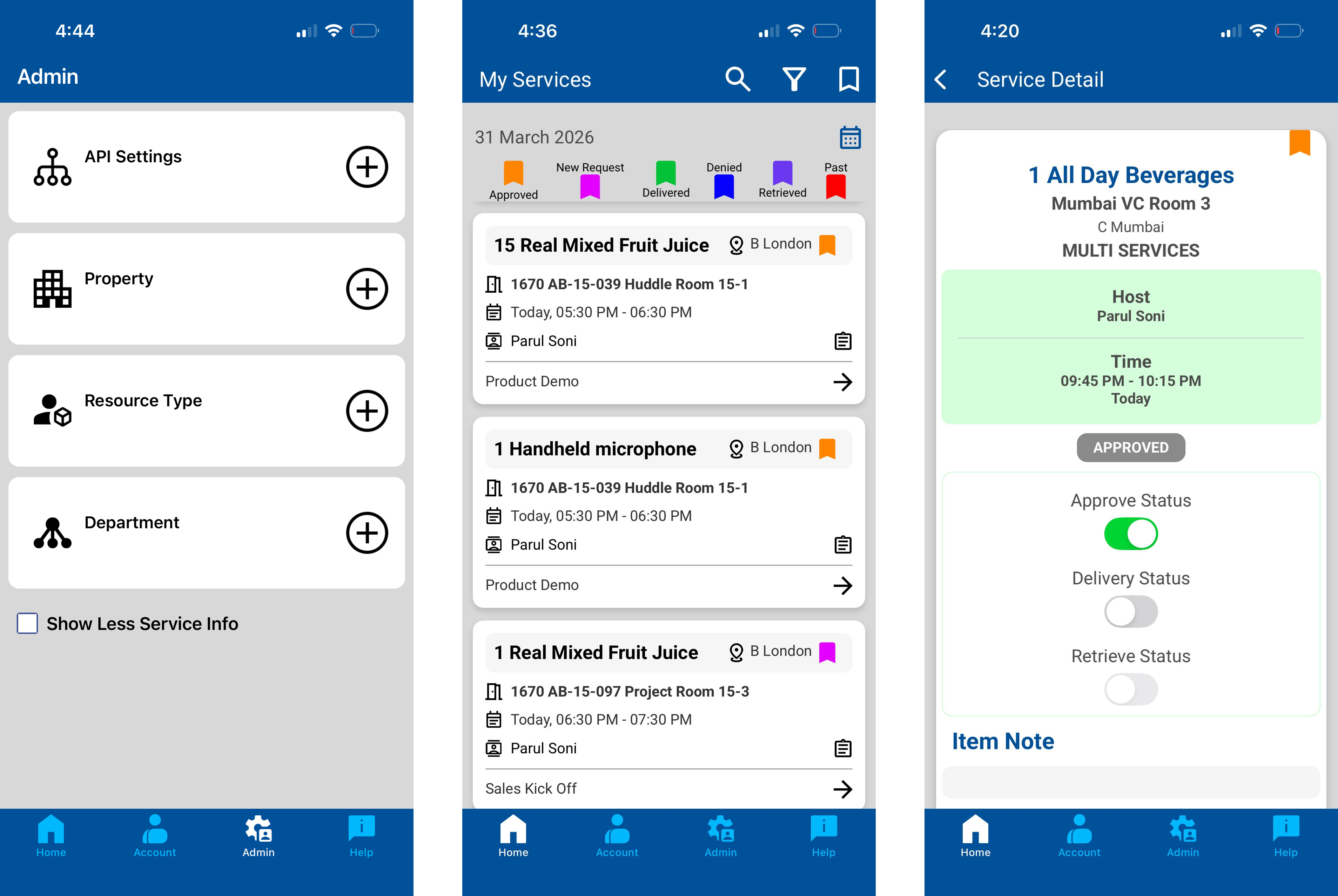
The app features an updated look and feel across all screens, including refreshed iconography, updated fonts, and a revised colour palette. These changes have been made to give the app a cleaner, more modern appearance. The core functionality and workflows remain exactly as before, and you will find everything in the same place as always.
What Stays the Same
All existing features and workflows are fully preserved in this release. You will be able to continue using the Service Tracker App exactly as before, with no disruption to your day-to-day processes or data.
Updating the App
This new version is delivered as an update to your existing Service Tracker App.
iOS (iPhone / iPad)
If automatic updates are enabled: No action is required. The update will be downloaded and installed automatically.
If automatic updates are not enabled:
Open the App Store and tap your profile icon in the top-right corner.
Scroll down to the list of pending updates.
Locate Service Tracker App and tap Update.
The app will download and install. Once complete, open it as normal.
Android
If automatic updates are enabled: No action is required. The update will be downloaded and installed automatically.
If automatic updates are not enabled:
Open the Google Play Store and tap your profile icon in the top-right corner.
Select Manage apps & device, then tap Updates available.
Locate Service Tracker App and tap Update.
The app will download and install. Once complete, open it as normal.
Note: If you are unsure whether automatic updates are enabled on your device, please check your device settings or contact your IT support team for assistance.
February 27th, 2026
Booking
What’s New?
Deep Link to Locate Colleague on Floorplan - Now supports Spaces allocated to users
We’ve enhanced the Deep Link to Locate Colleague on Floorplan capability (introduced in V9.7.1) to also work when a colleague is seated at a Fixed Desk allocated to them, not just when they have an active desk/space booking.
Fixed Desk resolution (allocated seats)
When the deep link is opened with a colleague’s email address (or GUID), Bookit can now locate the colleague even if they don’t have an active booking, if they are assigned to a fixed desk.
Bookit will retrieve the colleague’s allocated desk and focus it on the configured floorplan, matching the same experience as “Locate on Floorplan” from Find a Colleague.
Release Fixes and Changes
February 13th, 2026
Signage
We're constantly working to improve Korbyt. Here's what we were up to this week:
🆕 New & Enhanced
Enhanced Proof of Play (POP) with Hourly Reporting, giving all customers more granular visibility into content performance throughout the day.
Improved Proof of Play to ensure reporting data transitions more reliably between reporting cycles.
🐞 Squashed Bugs
Resolved a problem preventing target selection in Quick Actions and Data Triggers.
Fixed an issue where the font selector in Email Templates was not applying selected fonts.
Corrected a bug that caused images to break when saving and sending Email Marketing messages.
Fixed an issue where the SharePoint Adapter imported media without properly applying tags.
Resolved a dropdown issue in Screen Control and Screen Actions that prevented selecting the first item in the list.
Restored notification emails for predefined submission forms so alerts are now sent as expected.
Resolved a post-archiving error message that appeared after archiving content.
🛠️ Under the Hood
None this week
We love hearing from you! If you have any feedback or feature ideas, please use our feedback portal: https://product.korbyt.com/?b=671ef0a1ad059fed8945cda6
Need more info? Visit our help page for additional information: https://product.korbyt.com/help
The Korbyt Product Team