On-Premises Courier Options
The On-Premises version of Korbyt has unique Courier settings available due to it being housed completly on your servers
Written By Ed Kinne
Couriers allow Korbyt to access an external storage location and copy media items from that location and into the Korbyt Media Manager.
An On-Premsis CMS is able to define Couriers in ways that are not available to the Cloud-Based version of Korbyt.
Creating an On-Premises Courier
Open the Navigation Menu
In the Content Section, click Couriers
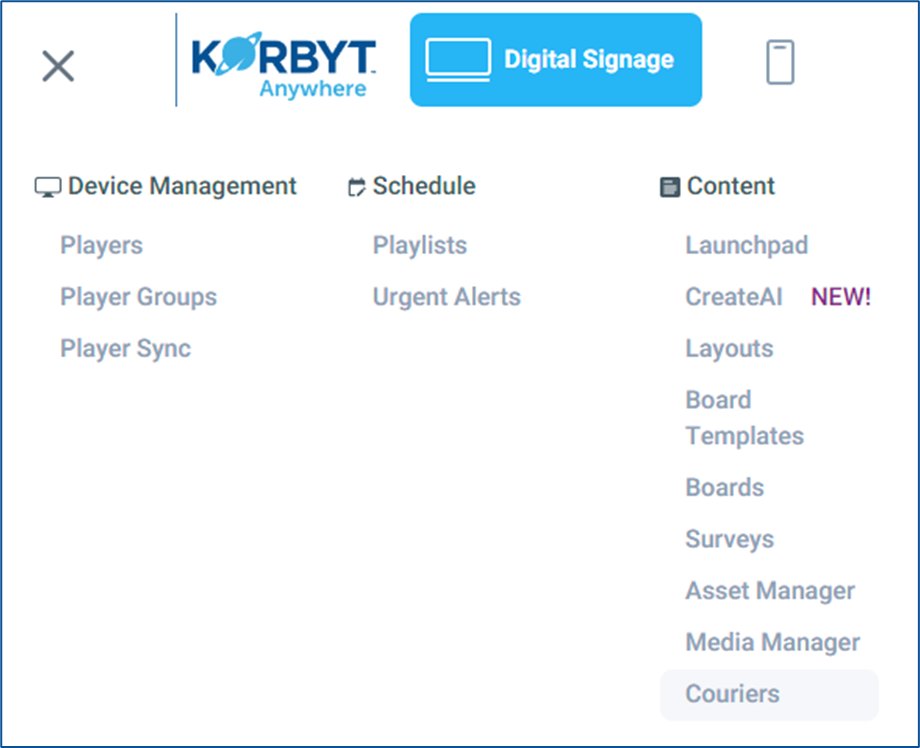
In the legacy version of Korbyt, Couriers is an option at the bottom of the blue navigation bar.
Click the Add Courier button to open the Courier settings
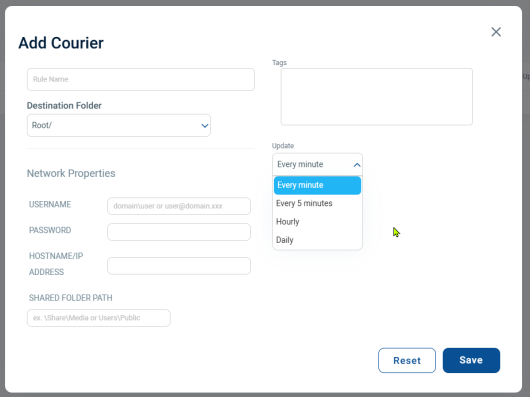
In the Add Courier screen
Add a Rule Name
Select a Folder in the Media Manager that will be the location where the Courier saves the items it imports
Configure the Network Properties
The username for the service
This can be in either a domain\user or user@domain.xxx format
Password
Hostname/IP Address
Shared Folder Path
Using either a \share\media or User\Public style path name
The Courier can not connect to the “root” folder
Add any Tags
Tags will be attached to all items the courier brings in, and then can be used in Clever Playlists to automate the item to the screen
Set the Update Schedule
Use the drop-down to set how often the courier will run, checking for new items
Click the Save button
Viewing and Editing Existing Couriers
On the Couriers screen, any existing couriers will be listed, displaying their details.
Clicking the Pencil Icon will open the Courier settings pop-up