Setting Default Content Playlist
Setting the items that will play when a Media Player has no other assigned content to show. If not specified, it will be a series of Korbyt Logo images that play
Written By Ed Kinne
To set a default Playlist
In the Schedule section, click on Playlists
Create a new playlist
This new playlist can be either a Standard or a Clever playlist.
Name the Playlist
The name does not have to be a specific value, but something similar to “Korbyt Default Content” should be used, so the playlist's purpose is clear
In the Playlist Settings, which can be opened in the upper right, add the tag “korbytdefaultcontent“ - This specific tag is required for the playlist to function correctly.
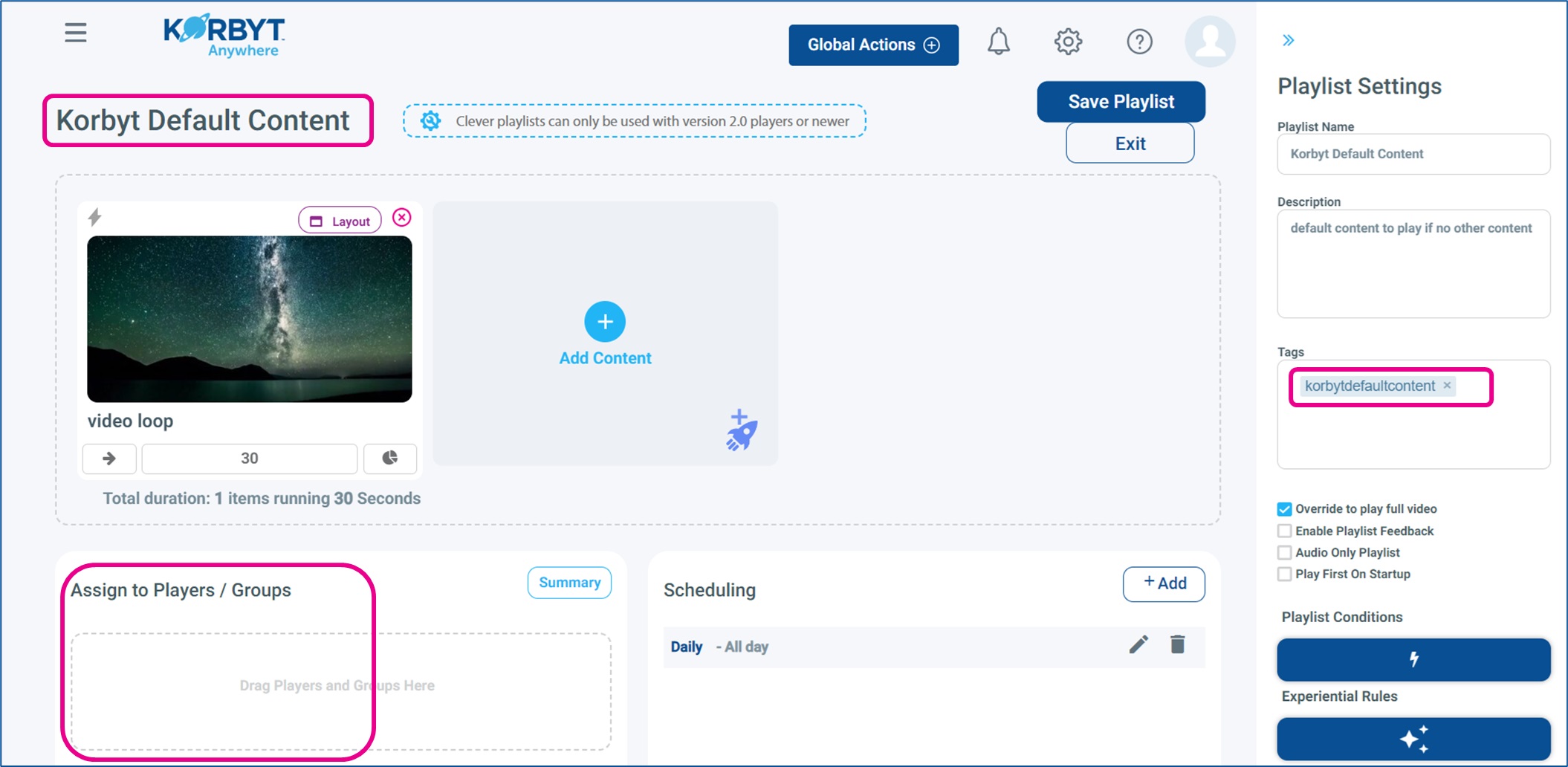
A description is optional, but can be very helpful for clear communication about the purpose of this playlist.
Add content items as you normally would
Once you have added your content, click the Save button in the upper right
DO NOT assign this playlist to any players
The system will send this to every player on their next check-in, and it will play “by default” when no other content is present or assigned to the player