How To Use a Clock Element
The Clock Element displays the current time on the screen. You can choose from an analog or digital display and even customize the clock face and hands for an analog clock!
Written By Ed Kinne

When you add a Clock Element, it will default to an analog view with a size set to Fill
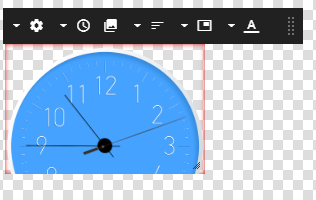
Customizing a Clock Element
The Options available will change based on Analog vs Digital clockface
Analog Options
Icon | Setting Description |
 | Settings change between Analog and Digital |
 | Timezone set Local Time (set by the player) or a specific timezone |
 | Clock Face select an image to be the clock face (replaces the default face completely |
 | Clock Hands select image files for the different hands |
 | Clock Skin select from the available default clock designs |
 | Center Dot set a custom color for the center dot |
Digital Options
Icon | Setting Description |
| Settings change between Analog and Digital |
 | Timezone change the set Local Time (set by the player) or a specific timezone |
 | Time Format select 12 or 24 hour format |
 | Font Size select a relative font size |
 | Font select a font |
| Font Color set a font Color |