How To Import External Layouts Built In A Separate HTML Editor
Written By Ed Kinne
What is a Layout?
A layout is a container for content in Korbyt that contains objects from various sources. You can include multimedia components within your layouts by attaching graphics and videos to the layout zones and associating sounds with individual messages. You can add these components from your own resources.
Korbyt supports: HTML, CSS, and JavaScript
This article reviews how to import a Layout built in an External to Korbyt HTML editing program.
This article reviews how to import a Layout built in an External HTML editing program, not a Layout built in Korbyt Nativley
Steps for Native Korbyt Layouts can be found in Exporting / Importing Korbyt Layouts Or Messages
How to Import a layout
Create your Layout
Using your HTML Editor of choice, build your indented screen design.
When saving this HTML source file it needs to be named index and have a file type of .html
Zip your creation, index.html , together will all assets (CSS, Javascrip, Image and other associated files) used in the construction.
Now that you have your Zip file with your intended layout
The steps below review the steps in your Korbyt Tenant to import your HTML package as a new Layout.
Import your Layout
Open the Mega Menu in the upper left
In the Content section, click on Layout
Click on the blue Create Layout drop-down towards the upper right
Select Import External Layout from the drop-down
You can then name your Layout, Add Tags (optional), and select the zip file from your computer that contains
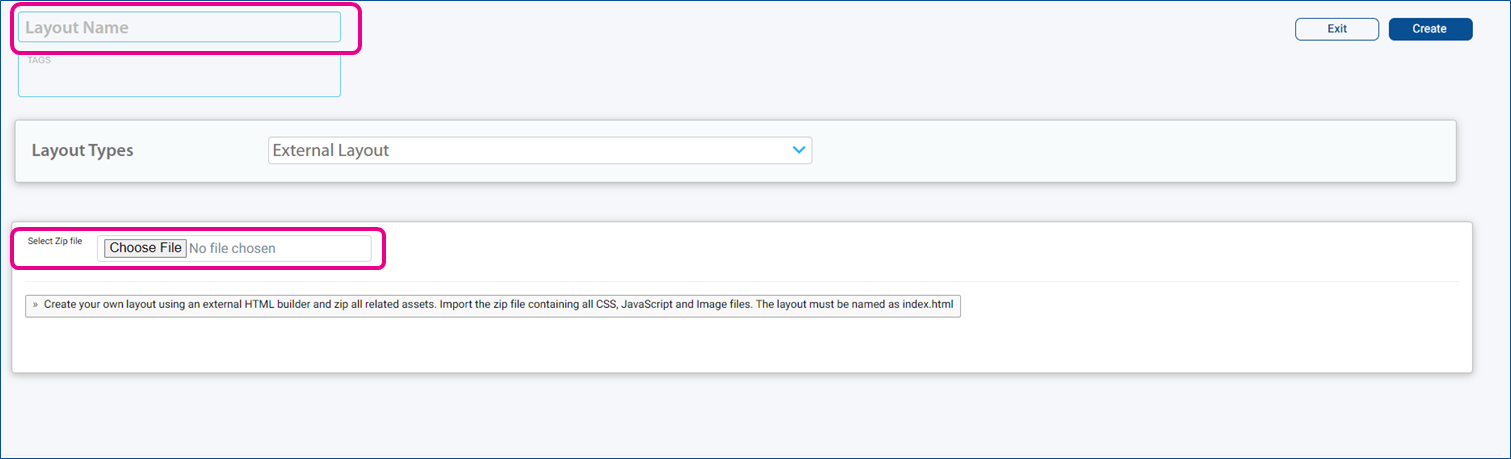
Then click the blue Create button
Your new layout will now be listed in your existing layouts