Korbyt Booking Mobile Release Notes
What’s New?
Improved Session Management
We’ve significantly upgraded how sessions are managed to deliver a more seamless and secure user experience.
Key Improvements:
• Persistent Authentication: Session tokens are now auto refreshed in the background, ensuring users stay logged in by default. No more surprise timeouts!
• Automatic Token Handling: The app now checks and refreshes access tokens at launch, providing uninterrupted access if tokens are still valid.
• Security Enforcement: If a user is deleted, deactivated, or has their password changed, the app will log them out immediately and display a clear message:
“Your session has been terminated by your organization’s admin. Please contact support if you need assistance.”
• Role and Permission Syncing: The app revalidates user roles and permissions every 20 minutes to ensure accurate access control in real-time.
These enhancements are built for efficiency and reliability—keeping you connected while safeguarding your organization's security protocols.
Enhanced Desk Booking Flow – Smarter, Faster, More Personalized
We’ve redesigned the Book a Desk journey in the Korbyt Booking Mobile App to deliver a smoother, more intelligent experience—whether you're booking for yourself or a colleague.
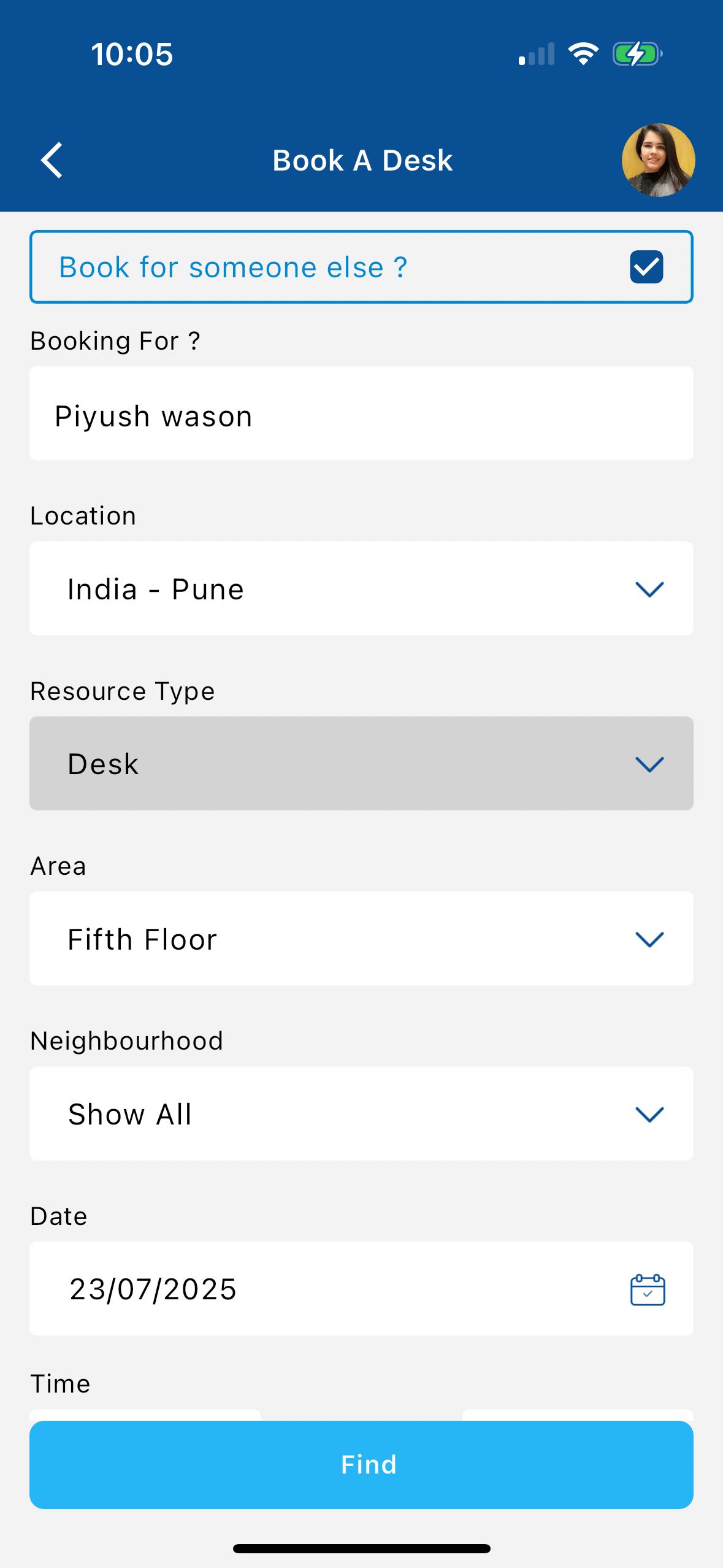
Find Screen Updates:
• New "Book for someone else" checkbox at the top.
- When checked, a “Booking for” field appears—search and select internal users using our standard attendee picker.
- Inline validation ensures a user is selected before proceeding.
• The capacity field is hidden and defaults to 1 (non-editable).
• Area and Neighborhood filters now respect user access permissions.
Refined Desk Booking Workflow:
This release introduces significant improvements to the Desk Booking journey in the Korbyt Booking Mobile App, with a focus on clarity, efficiency, and consistency across booking scenarios.
Key Workflow Enhancements:
• Simplified Booking Screen: The Booking Type field has been removed for desk bookings. Instead, it now automatically defaults to the configured Default Booking Type set in Global Settings > Mobile Configurations, reducing user input and improving consistency across the platform.
• Streamlined User Experience: The Title and Notes fields are now embedded directly within the Booking Information screen, eliminating the need for a separate summary step and accelerating the booking process.
• Focused UI for Desk Reservations: The Add Attendees feature has been removed from the desk booking flow to simplify the user interface for this specific resource type.
• Smart Booking Logic:
When a selected desk has no associated services, and its default title is set to Host, the system directly confirms the booking and displays the Thank You screen.
When services are available, users are guided to the Booking Information screen, where they can add services and confirm their booking. After service selection, users return to the info screen rather than a separate summary page.
• Chargeback Integration for Desk Bookings: Chargeback functionality is now extended to the Book a Desk flow. The Booking Info screen dynamically displays chargeback and GL Code fields.
Please note
• The host is always set as the person for whom the desk is being booked.
• The requester (or booking creator) is the logged-in user, whose details are stored accordingly.
These enhancements deliver a more intuitive and role-aware booking process that better aligns with real-world use cases and enterprise access controls.
New Host Field Functionality for Room Bookings
A dedicated Host field has been added to the Room Booking flow—improving clarity, accountability, and cross-platform consistency in bookings.
Key Enhancements:
• Located under the Title on the Booking Summary screen.
• Defaults the logged-in user if the user’s role is configured to do so.
• Otherwise, the field remains blank, allowing the user to search and select a host using the same search component as Internal Attendees.
• When editing a booking from My Bookings, the Host field is read-only (greyed out), preserving original booking ownership integrity.
Smart Attendee Logic:
• If the host is not already an attendee, the app checks:
If the host’s primary property matches the booking location:
▪ If status is In Office → added as In-Room attendee.
▪ If no status info is available → primary property logic is used.
If the primary property does not match the booking → added as Virtual attendee.
The In-Room attendee count updates only if the host is added as an In-Room attendee.
These improvements ensure that bookings are accurate, role-based, and aligned with policy settings, all while maintaining a user-friendly experience across platforms.
Smarter Booking Visibility with Enhanced "My Bookings" Tabs
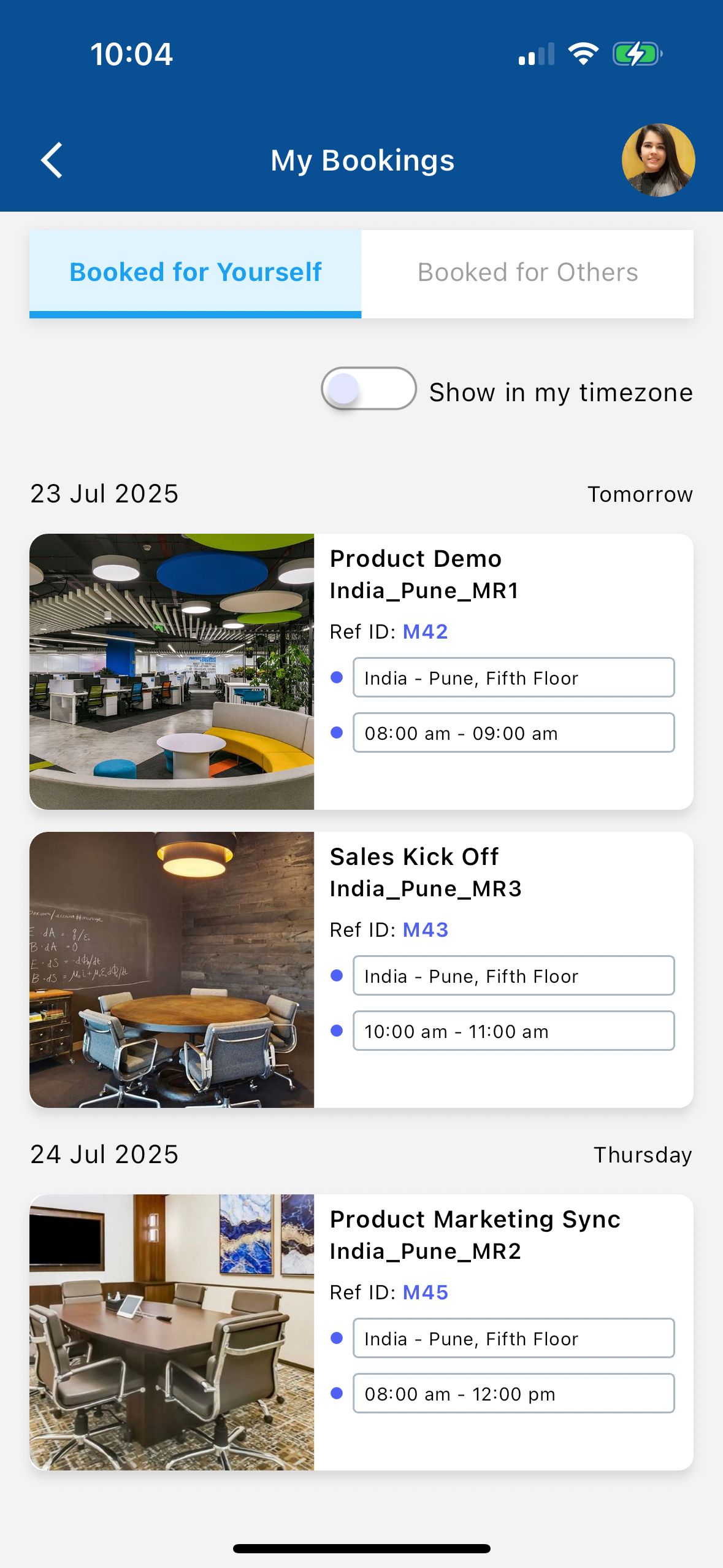
We’ve upgraded the My Bookings experience in the Korbyt Booking Mobile App to give users a clearer, more intelligent way to manage upcoming bookings—especially when working across time zones or on behalf of others.
Dual Tab Interface:
• Booked for Yourself: Displays all single-instance bookings and individual recurrence entries created by the logged-in user for themselves—across all resource types. Includes room bookings where the user is the host.
• Booked for Others: Displays bookings made on behalf of someone else, where the logged-in user is the requester, and the host is another user—covering both Room and Desk bookings.
Edit Bookings from “My Bookings”
Users can now edit eligible bookings directly from the My Bookings page, making updates faster and more flexible.
What’s New:
Update Booking Details:
Edit the Date and time of Future Bookings.
Edit the End Time for ‘in progress’ bookings—including extending or reducing the duration—while respecting availability and booking rules.
Modify the Title and Notes fields for both desk and room bookings.
Applies To:
Single-instance bookings
Specific Instances within a recurring series
Bookings made for yourself or others
This update empowers users to independently manage and adjust their bookings without leaving the mobile app.
Enhanced QR Code Booking Experience
The QR Code scan flow has been significantly enhanced to deliver a more dynamic and context-aware experience across all booking scenarios—Book, Check-In, and Check-Out.
What's New
Smart Time Defaults: Start time now snaps to the nearest 15-minute slot; end time auto-sets based on default booking duration or fixed slot settings based on the resource type.
Editable Fields: Users can update date and time when booking; the app dynamically checks availability before confirming.
Role-Based Access: Only eligible users can check in or out; unauthorized users are prompted to book another time.
Improved UX: Refined UI, contextual prompts, and integration with updated Book a Room and Book a Desk flows.
These enhancements make QR code interactions faster and more intelligent.