Korbyt Booking Release Notes v9.5
What’s New?
Enhanced Virtual Attendee Warning Message
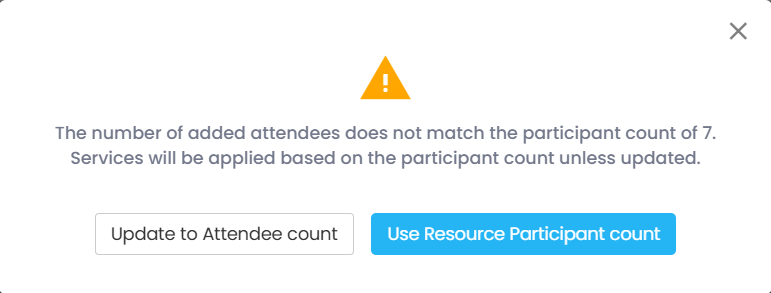
We’ve improved the Virtual Attendee Warning Message to help users manage discrepancies between attendee counts and participant values more clearly and efficiently.
Key changes:
When the number of added attendees does not match the participant count, users see a clear message indicating the mismatch if the warning has been enabled for the location from BRE Settings>>Bookings>>Covers/Attendee Restrictions.
The system explains that services will default to the resource participant count unless updated.
Users are presented with two actionable options:
Use Resource Participant Count – Retains the original resource participant count value and proceeds.
Update to Attendee Count – Automatically updates the participant count to match the number of attendees.
Both options apply changes behind the scenes and seamlessly save and close the booking.
This update ensures accurate service allocation while maintaining a smooth user experience when managing hybrid and in-room attendees.
Introducing Role-Based Control for Collaboration Visibility
A new role-based setting—"Hide Collaboration Details"—lets admins control visibility of the Collaboration field and Copy Link options.
When enabled under User Groups > Entity Property Settings, this setting:
• Removes collaboration visibility during create and edit booking workflows.
• Applies across all platforms and collaboration types (e.g., Zoom, Teams).
• Is off by default, giving full visibility unless restricted.
Perfect for limiting access for vendor or guest roles while maintaining collaboration for internal users.
New Email Tags: Resource_Code and Attendees
We’ve added two powerful new tags to enhance booking communications and reporting:
• @@Resource_Code@@Automatically inserts the resource code for rooms and add-ons.
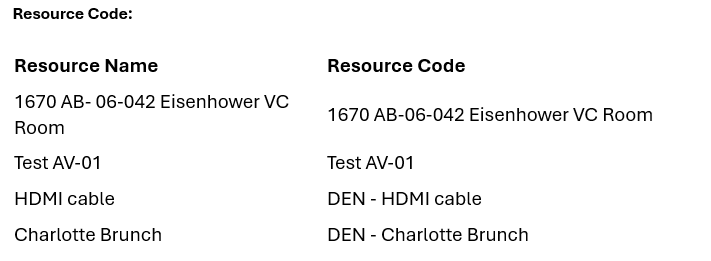
• @@Attendees@@Displays the Name and Email Address of all attendees, formatted as:
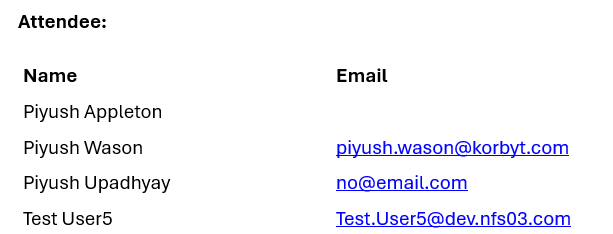
These tags help personalize alerts, improve clarity for recipients, and support detailed reporting and audit needs.
New Admin Control: UDF Support for Floor Plan Bookings
Admins can now manage whether User Defined Fields (UDFs) are shown during bookings made via the Floor Plan.
What’s New:
• A new checkbox setting labeled "Enable User Defined Fields for Floor Plan Bookings" is now available (enabled by default).
Location: Settings > Global Settings > Floor Plan
• When enabled and UDFs are configured, clicking Book on the Floor Plan redirects to the Booking Summary screen in Bookit to capture UDF data.
• When disabled, the Floor Plan booking flow remains unchanged.
This setting gives you flexible control over data entry during Floor Plan-based bookings without disrupting other workflows.
Activate Insights: Google Analytics Now Available
Unlock visibility into how users interact with Korbyt Booking & Bookit through integrated Google Analytics.
Key Capabilities:
• Track feature usage, navigation paths, drop-off points, and engagement trends.
• A new "Enable Analytics" setting (Yes/No) gives admins full control.
Location: Settings > Global Settings > Default Settings
• Enabled by default — ensuring insights are available right out of the box.
• When turned off, no data is collected or transmitted, ensuring compliance.
Note: While this feature does not impact customer-facing functionality directly, the insights gathered play a key role in helping our Product team enhance user experience and shape future improvements across Korbyt Booking & Bookit.