Korbyt Booking V9.4
What’s New?
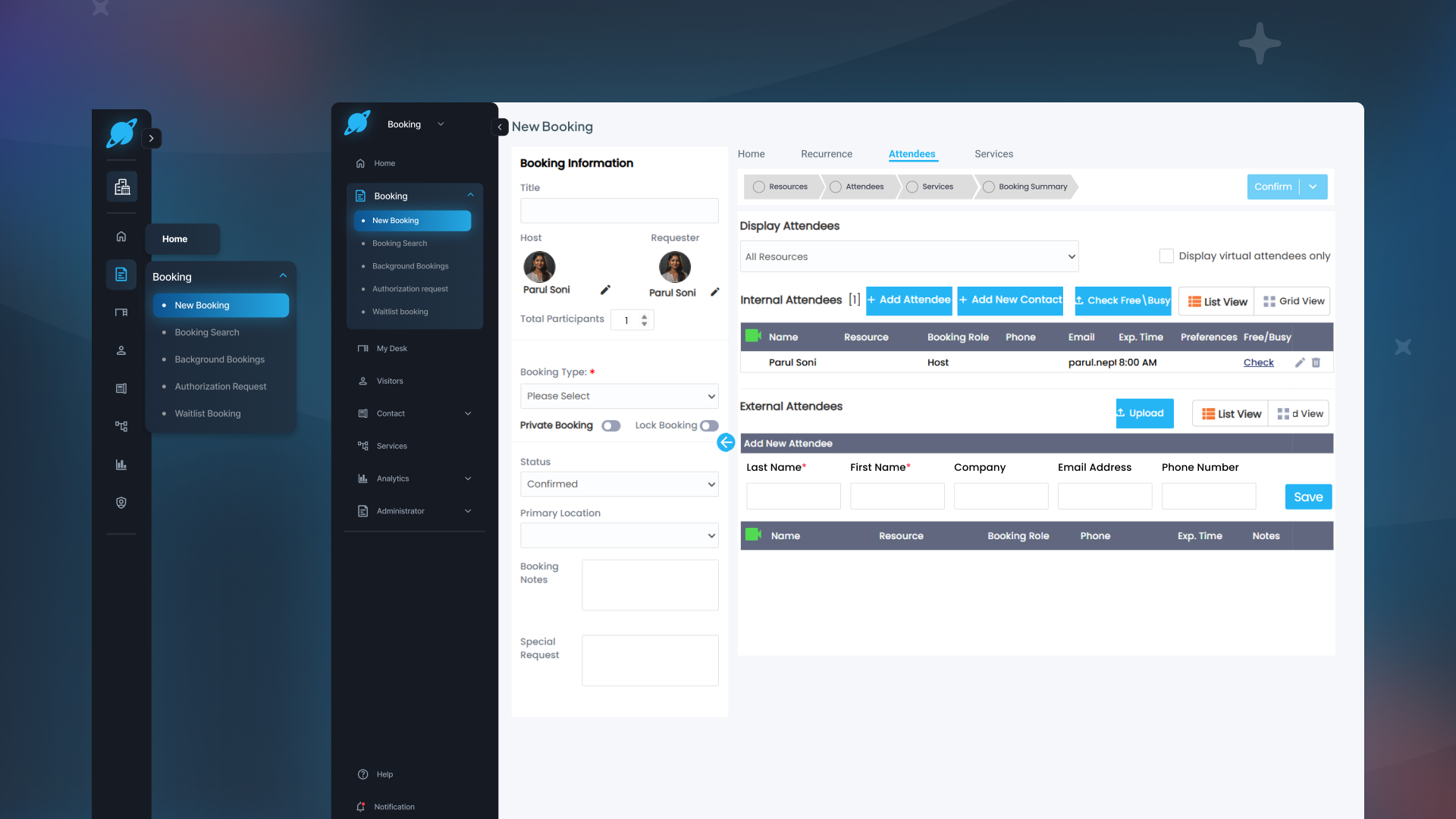
New Modern Left Navigation for Korbyt Booking — Admin Experience
We’re introducing a refreshed left navigation in Korbyt Booking, designed to give administrators a modern interface and a more efficient management experience.
What’s new for admins?
Simplified management access: Easily navigate between Admin Settings, Space Management, Booking Rules, and Reports from a clean, organized sidebar.
Consistent admin console: The updated layout aligns with the broader Korbyt platform, giving you a familiar and intuitive workspace.
Faster workflows: Clearer labels and fewer clicks make it quicker to configure spaces, manage user permissions, and monitor booking insights.
Why it matters?
As an admin, you’ll benefit from a seamless, streamlined experience that makes it easier to manage spaces, enforce policies, and support your users — all from one intuitive place.
The tools you rely on are now easier to find and faster to use.
Introducing the Product Widget for Korbyt Booking & Bookit!
We’re excited to announce a brand-new way for users to share feedback, suggest features, and explore resources—all without leaving the Korbyt platform!
What’s New?
With the Product Widget integrated directly into Korbyt Booking and Bookit, users can now:
Submit Feedback & Feature Requests - Submit feedback or request new features directly from the Korbyt application.
Access the Knowledgebase - Access our comprehensive Knowledgebase instantly to get answers to common questions, product guides, and best practices.
Explore the Product Roadmap - Stay informed! The widget lets you view the latest updates on our Product Roadmap to see what’s coming next.
How It Works:
Look for the Korbyt icon on the bottom right of your screen on the landing page on Korbyt Booking or Bookit.
Click it, and the Product Widget will open up, giving you access to:
✅ Feedback & Feature Submission
✅ Knowledgebase
✅ Product Roadmap
The Product Widget is enabled by default for all users and can be turned off via Global Settings by your administrator if desired.
Your insights help us shape the future of Korbyt!
Exciting Update: Korbyt Bookit is now integrated with Korbyt ECA
We are excited to announce that Korbyt Bookit is now fully integrated with Korbyt ECA, combining both solutions into a single, unified platform. This integration is designed with the user in mind, enhancing the workplace experience by smoothly connecting room booking with powerful employee communication tools.
Key Changes
• One Unified Platform: Bookit & ECA are now part of a seamless platform, allowing users to easily manage room bookings and workplace communications from a single, intuitive interface.
• User-Centric Experience: This integration is focused on enhancing day-to-day interactions, providing a simpler, more intuitive booking experience that’s designed with user needs in mind.
• Streamlined Workflows: Effortless navigation between room scheduling and communication tools, reducing friction and saving time.
• No Service Disruption: There are no changes to the current setup. All existing features remain intact, with data and configurations fully retained.

Virtual Attendee Feature - Smarter, Hybrid Collaboration!
The Virtual Attendee feature, designed to make hybrid meetings smarter and more efficient. With this feature, managing both virtual and in-room participants have become even easier and more intuitive.
Key Features and Workflow
• Easy Toggle for Virtual Attendees: A toggle button in the People section allows users to easily mark attendees as virtual. By default, If the attendee’s primary property matches the selected resource, the toggle will be Off else enabled.
• Consistent Virtual Attendee Icon: Once an attendee is marked as virtual, a virtual attendee icon will appear, clearly indicating their status across all screens in the booking journey, ensuring consistency throughout the process.
• Automatic Resource Assignment: When attendees are added before selecting a resource, the system will automatically match their primary property with the selected resource. If there’s a match, the attendee is assigned to the room; if not, they will be marked as virtual.
• Automatic Service Assignment: In Room Attendee count will automatically define the count of service items being added to the booking.
• Manual Updates: If an attendee is manually marked as virtual or in-room, manual changes will take precedence giving users full control of the booking.
• Resource Capacity Restriction: If 'Attendee cannot exceed Max Resource Capacity' is set to Yes under the BRE Settings, attendees only up to the max capacity of the resource can be associated to a space to ensure there is enough room for the invited attendees and the optimum space is chosen for the booking.
• Encourage Collaboration: If the space added to the booking is collaboration enabled, and there is at-least one virtual attendee added to the booking, the system will remind you to choose the requisite collaboration tool for seamless interaction with all attendees.
• Efficient Visitor Management: Internal & External Attendees who are not marked as virtual will be added to the list of Visitors allowing front desk teams to check them into the building offering a holistic workplace experience.
• Ensure Optimal Space Utilization: A new BRE setting ‘Require at least one attendee per room’ has been introduced which if enabled, ensures at least one attendee must be assigned to the room to prevent unused bookings and optimize space allocation. If disabled, users and Reception teams will be able to bypass and book spaces even without an attendee allowing the flexibility to update bookings later.
Please Note: Manual changes made by users will take precedence over auto-calculation
Additional Enhancements
Outlook Add-in Enhancements
We are excited to announce several key improvements to the Edit Journey within the Korbyt Booking Outlook Add-in. These updates are designed to provide users with greater flexibility and control when managing their space bookings directly from Outlook.
What’s New?
Add spaces across multiple Locations
Users can now easily add spaces to their booking and seamlessly navigate to the “Find Space” screen to search and reserve spaces across multiple locations. This enhancement ensures that users are not limited to their default location and can effortlessly secure rooms or desks in other office sites as needed.
Streamlined Edit Experience with Prioritized Booked Spaces
When users click Edit on an existing booking:Their currently booked spaces will be displayed first, followed by other available spaces within their default location.
Users can unselect existing rooms and choose alternative or additional spaces with just a few clicks, offering greater flexibility to adjust bookings on the go.
Quick Access to Booking Information
A new Booking Information option allows users to directly access booking details (if enabled for the Outlook Add-in). This includes:Viewing the booking type (e.g., internal meeting, external visitor, etc.)
Reviewing any chargeback-related information associated with the reservation.
This feature simplifies visibility into booking metadata without needing to navigate through the entire booking journey.
Easier Room Removal from Bookings
Users can now quickly remove a room from their booking directly from the Booking Summary screen using the new Delete option. This allows for faster adjustments and cleaner booking management when plans change.

Prerequisites
Office 365 Exchange Administrator rights are required to deploy an add-in.
Hosted link for Korbyt Booking application V9.0 & above
Korbyt Booking application must be configured with SSL.
A valid manifest.xml file that consists of links of Korbyt Booking that will work as Outlook add-in.
Exchange Add-Ins can take up to 24 hours to show in users add-ins list.
Note: This release does not require a manifest update.
Release Fixes and Changes
For more information, please reach out to the Product team.