Korbyt Booking Release Notes V9.8.1
What’s New?
Bulk Resource Add-on Configuration
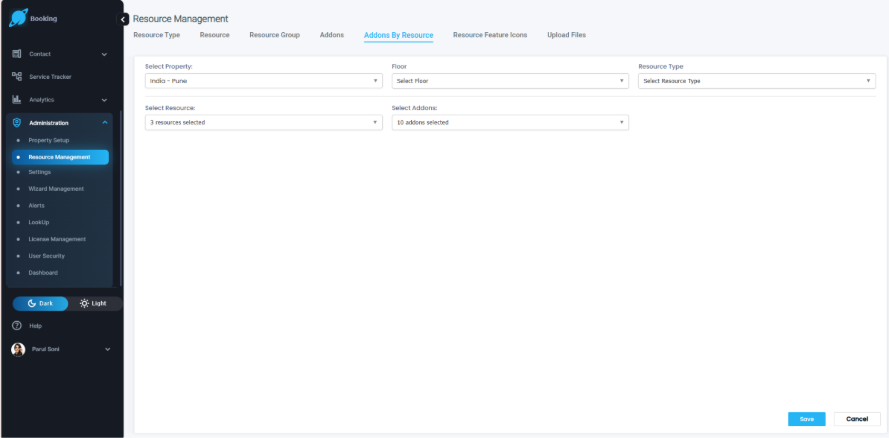
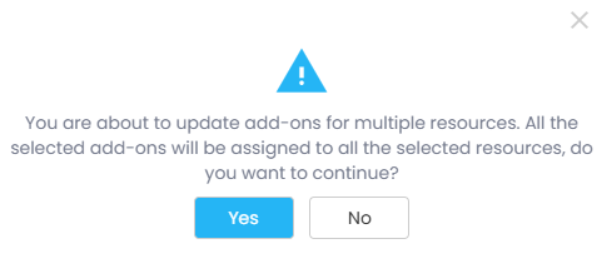
Admins can now apply add-ons to multiple resources in a single action instead of repeating the same configuration for each resource. The Resource Add-on Configuration screen has two new multi-select fields, Floor and Resource Type, that cascade from the selected Location and narrow which resources are listed; the Resource picker is also multi-select. A live count of selected resources and add-ons appears alongside each Select All control, and clicking Save shows a confirmation pop-up before applying the chosen add-ons to every selected resource at once.
Auto-Calculate Total Participants from Per-Room Counts
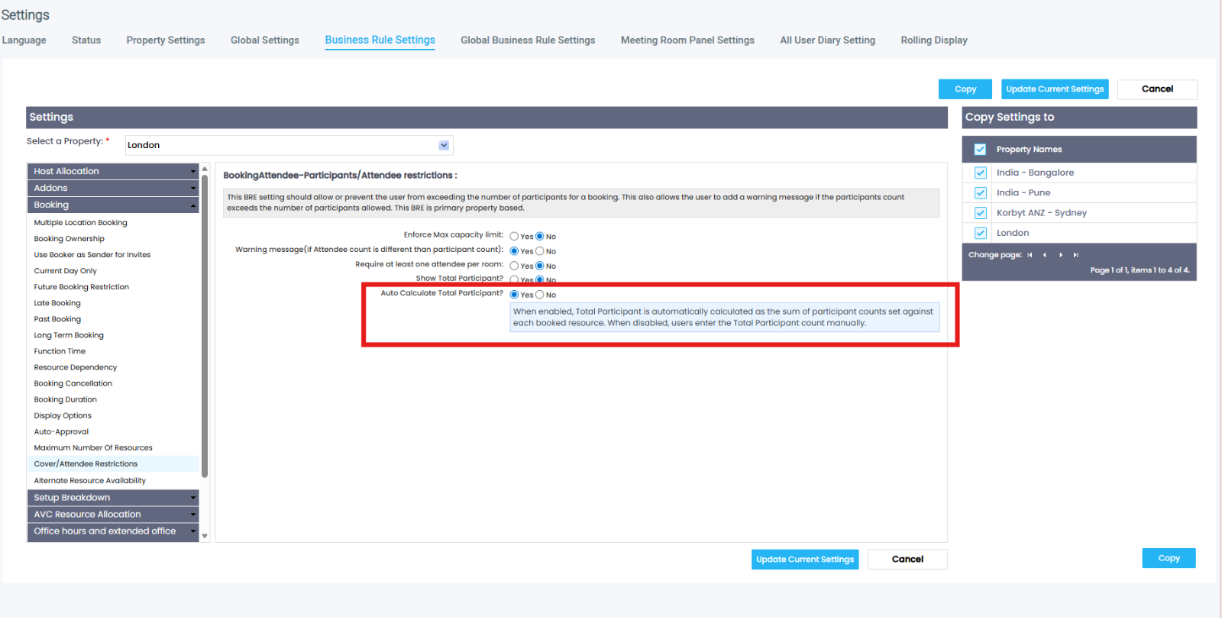
A new Business Rule setting, ‘Auto Calculate Total Participant’, gives administrators control over how the Total Participants field is populated on a booking. When the setting is Yes (the default), the field is read-only and equals the sum of the Resource participant counts entered for each booked room. It updates LIVE as spaces are added, removed, replaced, or have their Resource participant counts changed. When the setting is No, the field stays manually editable and is unaffected by changes to Resource participant counts. The behaviour applies to bookings created through Korbyt Booking and Bookit.
What Admins Need to Do
The setting is located under Administration → Settings → Business Rule Settings → Booking → Cover/Attendee Restrictions, directly beneath the Show Total Participant setting. The default value is Yes. The setting is property-based: on Korbyt Booking it follows the booking's primary property, and in Bookit it follows the logged-in user's primary property.
O365 Add-in | List and Floor Plan View Refresh
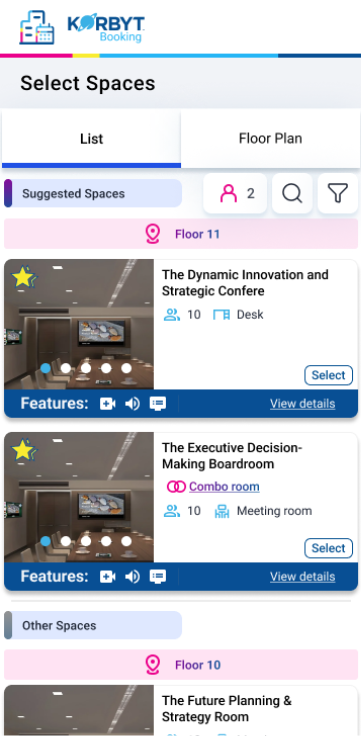
The List and Floor Plan views in the O365 Add-in have been updated with a refreshed visual design. Resource cards now display Attendee and Resource Type icons, replacing the legacy Floor label with cleaner iconography. Room and Desk resource types are distinguished by dedicated icons, making space types immediately recognizable at a glance. The Floor icon has been updated with a new highlighted treatment, and the Attendee icon in the header carries a revised color style consistent with the updated design language.
API: Update the Non-Exchange User Flag on a User Profile
A new API endpoint lets administrators and integration developers update the Non-Exchange User flag on a user's profile without opening the Korbyt Booking admin UI for each user. The endpoint supports both single-user and bulk updates. The change is reflected immediately under Administration → User Security → User and is recorded in the system audit trail along with the timestamp and caller identity.
Additional Enhancements
Multiple Resource Images throughout Bookit
Resources with multiple images now displayed as a carousel in Bookit across Resource Search, the Booking Form, My Bookings, and the Bookit Floorplan. Users can navigate images using left and right arrows.
Azure AD User Sync | Improved Handling of User Import
Resolved an issue where certain users were not being imported into Korbyt Booking during an Azure AD / Entra ID sync. This affected environments where user accounts are managed directly in the cloud without synchronization from an on-premises Active Directory. Affected users will now import successfully without any manual intervention required.