Korbyt Booking V9.6
What’s New?
Left Navigation Light Mode
We’re bringing even more personalization to your Korbyt Booking experience with the introduction of Light Mode for the modern Left Navigation.
Now, administrators can switch between Dark and Light themes for the navigation panel, choosing the look that best fits their preferences.
Key Highlights:
Consistent Design: Built on the modern Left Navigation introduced in v9.5, maintaining the same layout, groupings, and quick access to key admin tools.
Easy to enable: Light Mode will be the new default however can be toggled at the user level, with no impact to existing workflows or permissions.
Aligned with Platform Aesthetics: Matches the evolving Korbyt design system for a unified experience across Booking and Signage modules.
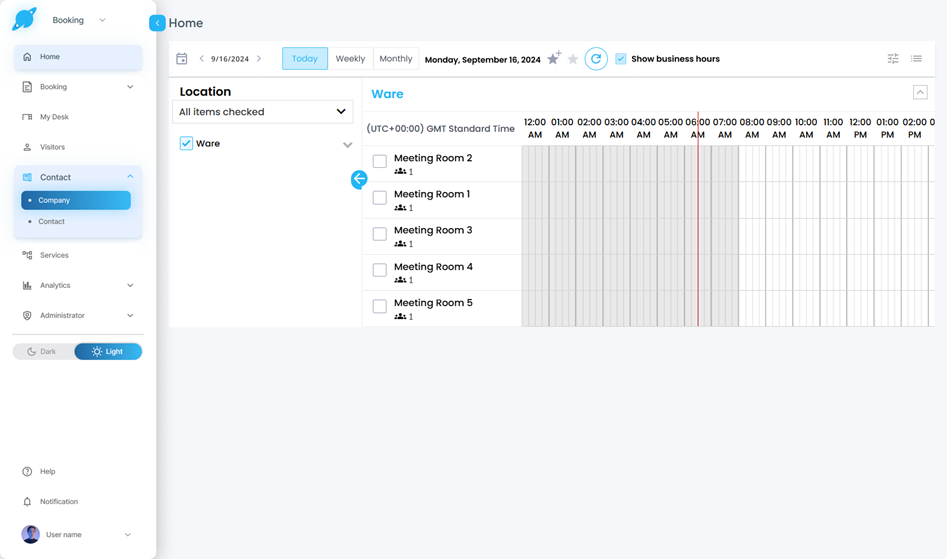
This enhancement is all about giving you more flexibility and comfort while managing your workplace, whether you prefer a sleek dark canvas or a bright, minimalist workspace.
Smarter Availability for Fixed-Slot Spaces: Now Includes No Shows and Early Check-Outs
We’re making Fixed Slot bookings in Korbyt smarter and more dynamic ensuring that released spaces (due to Check-Out or No Show) instantly become available for rebooking across all Korbyt interfaces, including the O365 Add-in, Web, Bookit, and Mobile.
This enhancement improves space utilization, giving users more flexibility to find and book available rooms or desks even after a slot has started.
Key Highlights
Time-Aware Slot Selection: When booking for the current day, the system now intelligently detects the current time and snaps it to the nearest future 15-minute mark. The end time automatically aligns to the end of the fixed slot (AM, PM, or Full Day).
Dynamic Slot Population: The available slot hours are dynamically populated in the Time dropdown of the New Booking screen based on the selected resource type (Fixed Slot).
Slot hours automatically refresh when filter fields (e.g., Property, Area, Resource Type) are changed.
Both the current time and fixed slot time are passed to the backend to fetch only the currently bookable spaces.
Smarter Availability After Check-Out / No Show:
When a Fixed Slot booking is checked out early or marked as a No Show, the remaining duration of that slot (from current time → slot end) becomes immediately bookable.
These released slots automatically appear in search results if they are valid for the selected slot window.
Auto-Check-In for Late Slot Bookings: Current-day bookings made after a slot’s start time automatically check in (if the resource’s auto-check-in setting is enabled).
This update gives users greater flexibility and maximizes workspace efficiency ensuring that no available slot goes unused, and that every room, desk, or space remains accessible right when it’s needed most.
Real-Time Refresh Mechanism for the O365 Add-in
We’ve made the Korbyt Booking Outlook Add-in smarter, faster, and more responsive, ensuring your booking data always stays accurate and up to date as you make changes in Outlook.
With the new real-time refresh mechanism, any change you make to your meeting details (date, time, attendees, or recurrence pattern) instantly triggers an automatic refresh of your booking panel giving you the confidence that the spaces displayed are always available.
Key Highlights:
Instant Refresh on Update: Whenever you adjust meeting details in Outlook whether changing the date, time, recurrence, or attendees, the Add-in automatically refreshes the right-hand panel to verify space availability in real time.Fast, Seamless Experience: The Korbyt Loader now appears while results refresh, ensuring a smooth user experience. Refresh completes in under 2 seconds, keeping your workflow uninterrupted.
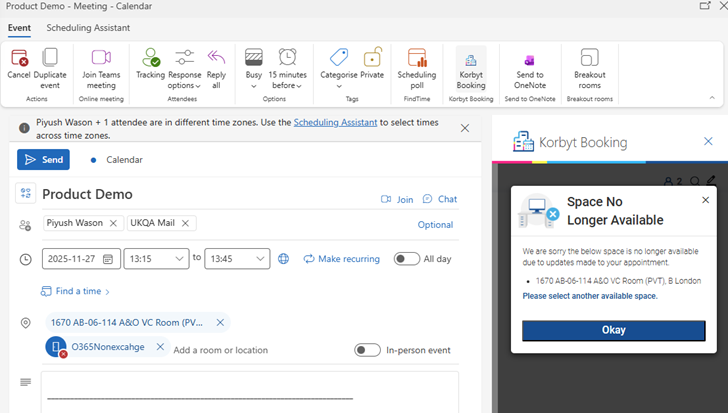
Smart Availability Check: If one or more booked spaces become unavailable due to the updates, the system instantly alerts you with a clear message:
When multiple spaces are affected, users see a full list of unavailable spaces (e.g., Room A, Location A; Room B, Location B).
After acknowledging the message, the Add-in automatically navigates to the Select Space screen with refreshed availability results for the affected location(s).
Users can then pick one or more alternative spaces across any location as per the regular booking flow.
Virtual Room Handling: If all non-Exchange rooms are no longer available, the previously added virtual meeting link is automatically cleared from the location field once the refresh completes.
Applies to Both Create & Edit Journeys: The refresh logic is consistent across new bookings and edits, ensuring a reliable, real-time experience every time you interact with your calendar.
This enhancement ensures your Outlook Add-in always reflects the true availability of your resources, no more stale data, missed conflicts, or outdated space selections. It’s responsive booking, redefined.
Additional Enhancements
Intelligent Grouping & Sorting for Suggested and Other Spaces
Finding the right space just got smarter. With this enhancement, Korbyt Booking’s O365 Add-in now intelligently organizes and ranks available spaces showing users the most relevant, nearby, and preferred rooms first, all while maintaining a clean and intuitive design aligned with the latest Figma specifications.
This experience optimizes visibility, giving users contextually prioritized “Suggested” and “Other” spaces grouped by floor, sorted by relevance, and personalized by user preferences.
Notes Field in Booking Information Screen
We’ve made collaboration between Outlook and Korbyt Booking even more seamless by introducing a new Notes field in the Booking Information screen of the O365 Add-in.
This addition keeps context consistent across every platform whether you’re creating, editing, or delegating a booking.
New App Settings Screen
The new App Settings page brings all essential WebApp and Alert Service configurations together in one place. It simplifies management of login flow, SSRS reporting, and config updates while making it easier to verify alert processing, email delivery, and report-based alerts using SSRS or Telerik. A faster, cleaner way to manage the system. Only global admins will be able to login at KorbytBookingWebappURL/Pages/appsettings.aspx.

Private Booking Sync with Outlook
We’ve expanded Private Booking functionality to include full synchronization between Outlook and the Korbyt ecosystem, ensuring privacy settings remain consistent wherever a booking is managed.
Key Highlights:
Automatic Flag Detection: When a user checks the Private flag in their Outlook appointment, any associated space booking saved in Korbyt Booking will automatically have the Private Booking flag set to True.
Consistent Privacy Behavior: Private bookings behave exactly as they do when created in the Web App, details are hidden from other users and panels while maintaining visibility for administrators and authorized delegates.
Two-Way Sync: Private status changes made from Korbyt Booking, Bookit, or the Bookit Plug-in now update the corresponding Outlook appointment and vice-versa.
Together, these enhancements deliver a more cohesive, privacy-aware, and information-rich booking experience whether you’re scheduling directly in Outlook or managing bookings from any Korbyt interface.