Korbyt Booking Release Notes V9.8
What’s New?
Book by Floor Plan in Korbyt Booking
Floor Plan Booking is now available directly in Korbyt Booking. Users no longer need to switch applications to take advantage of their organization's configured floor plans. The entire booking journey, from browsing a visual layout to confirming a space with services and chargeback, is now available in one place.
Floor Plan Navigation in the Left Menu
A dedicated Floor Plan entry now appears in the left navigation of Korbyt Booking. Users can access it directly, without needing to go through the standard new booking flow first. This improves discoverability and reduces clicks.
Interactive Visual Layout
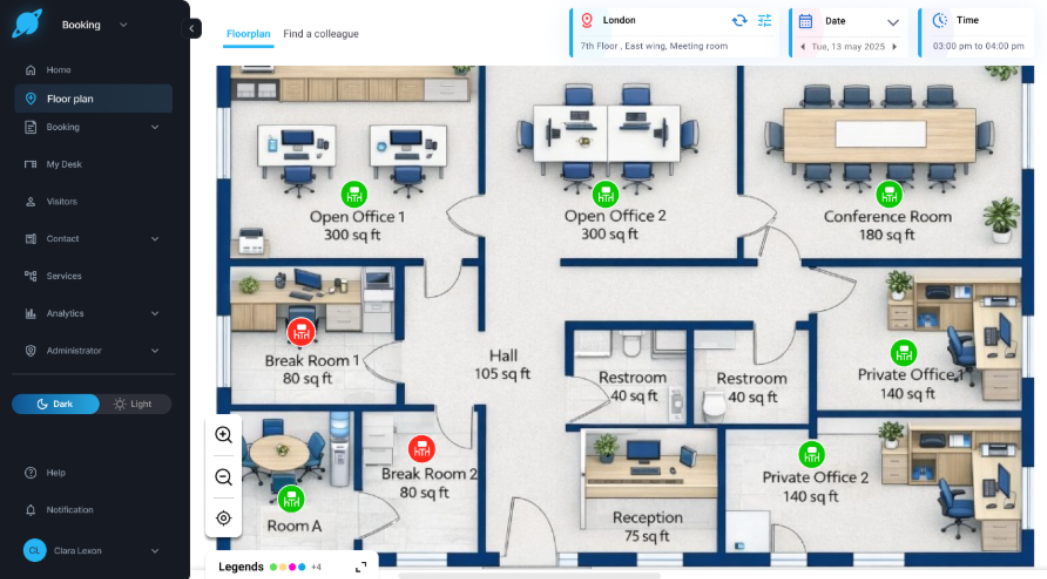
Once inside, users see a fully interactive rendering of their primary location's floor plan, the same one configured by their admin. Rooms and desks are pinned to their real positions on the floor. Green indicators show available spaces. Users can zoom in, navigate by floor, and see exactly what's around them before they commit to a space.
End-to-End Booking Flow from the Floor Plan
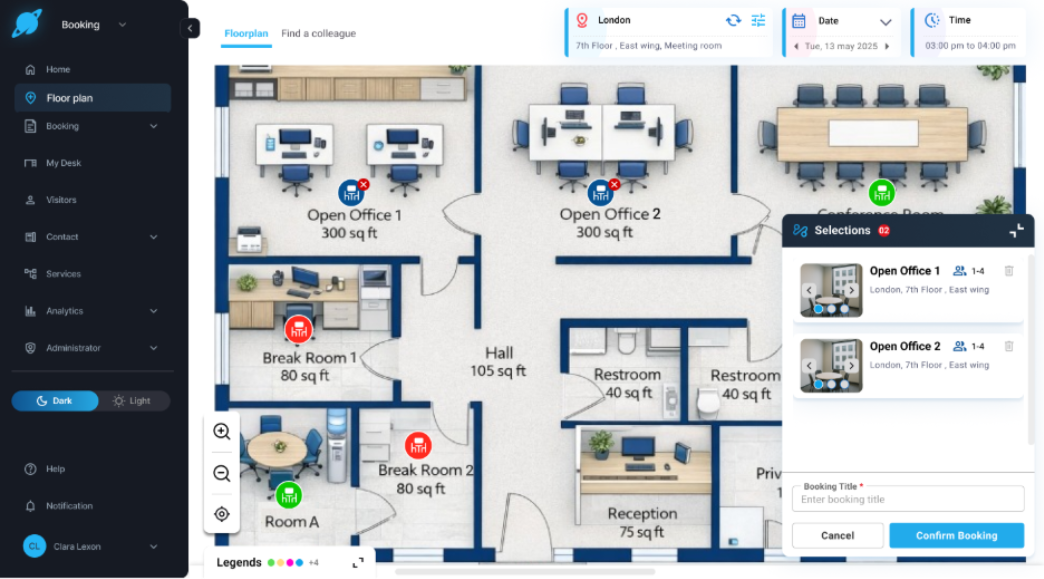
Selecting a space from the floor plan launches the complete booking journey, the same flow users already know. This includes:
Adding attendee details
Adding services and catering requirements
Applying chargeback and booking type logic
Booking rules, authorization prompts, and error handling
Booking confirmation with email notifications to relevant parties
No features are left behind. If a user selects a space that requires authorization, the appropriate prompts still appear. Booking rules and restrictions remain in force.
What Admins Need to Do
The feature is enabled by default for all users with the appropriate permissions. If you'd like to restrict access, it can be switched off under Administration → Global Settings → Default Settings →Uncheck ‘Enable Floorplan’.
Add-ons Preserved When Editing Booking Time Within Cut-off
A new feature flag → Preserve Add-ons Within Cut-off has been introduced under BRE Settings → Addons → Addons. It is off by default.
When enabled, add-ons are preserved when the booking time is changed on the same date and the booking remains within the cut-off period. Any change to the date, even if the new date still falls within the cut-off period, follows existing production behavior. If no changes are made to date, time, resources, or attendees, add-ons are unaffected regardless of the flag setting.
Cut-off popup behavior by flag state:
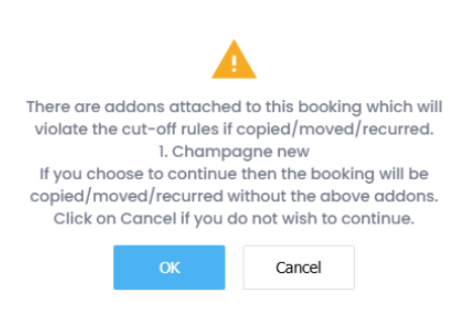
Preserve Add-ons Enabled: Add-ons are retained only for same-date, time changes within the cut-off period. All other edits within cut-off show a popup informing the user and drop add-ons on confirmation.
Preserve Add-ons Disabled: A popup always appears informing the user and drop add-ons on confirmation, when a booking is moved within the cut-off period, whether the date or time has changed.
New User Group Settings Introduced
Restrict Modification of Date & Time
Added under User Groups → Entity Property Based → Modify Booking.
This setting is unchecked by default, and when enabled, users in the group cannot change the date or time of other users' bookings. Users retain the ability to edit date and time only on bookings where they are the Organizer.
Restrict Add/Delete of Attendees
Added under User Groups → Entity Property Based → Show Attendees tab.
This setting is unchecked by default and can only be enabled when both ‘Modify Bookings’ and ‘Show Attendees tab’ are checked. If either of those settings is unchecked, this setting cannot be selected and displays a no-entry icon on hover. When enabled, users in the group can view and edit attendees on other users' bookings but cannot add or remove them.
Note: These settings address a specific access control concern. When bookings are linked to a user's Exchange calendar, admins with modification rights inherently gain delegate access over that user's calendar. These controls allow tenants to scope that access more precisely without removing modification permissions entirely.
Global Add-ons: Participant Count and Pricing Improvements
Participant Count Preserved
Switching to a Global Add-on resource type during booking no longer resets the Participant Count to 1. The count is retained per line item, and different add-ons can carry different participant counts independently.
Add-on quantities now default based on configuration — Unit-type add-ons default to 1, Participants-type add-ons default to the entered participant count. Resource covers in the Booking Summary and Service Tracker update accordingly on save, eliminating the previous mismatch between the two.
New Total Column
A Total column: calculated as Participants × Rate, has been added to the Resources grid. It updates in real time as values change and is display-only. For hourly-priced spaces, the Total adjusts proportionally to the booking duration.
A new Display Total Price on Booking Summary setting is available under Property Settings in Global Settings, enabled automatically when Display Room Price on Booking Summary is turned on.
Additional Enhancements
Multiple Images for Resources
Admins can now upload up to 5 images per resource in Korbyt Booking. Images appear as thumbnails in the resource configuration and display across the Outlook Add-in list view, Floor Plan view & Resource Details in Korbyt Booking.
Outlook Add-in Honors Selected Room Layout
The Outlook Add-in now carries the room layout selected during search through to the created booking. Previously, bookings defaulted to the room's default layout regardless of what was selected in the preference.
Organizer Field Locked in Bookit Edit Mode
When editing a booking in Bookit, the Organizer field is now read-only. The Organizer reflects the Exchange calendar against which the booking was made, and since Outlook does not permit changes to this after creation, Bookit now enforces the same restriction.
Custom Recurrence Pattern Hidden for Exchange Spaces
Custom recurrence option is now hidden for Exchange spaces in Korbyt Booking, replacing the previous behavior where it was visible but blocked with a no-entry icon. This applies across both Create and Edit Series journeys, and takes effect whenever Impersonate Outlook for Recurring Bookings is set to Yes.
Booking Title No Longer Truncated on Diary and Booking Screens
Long booking titles are now displayed in full across the diary, and all associated Booking Details and Booking Summary screens. On the diary, hovering over a booking shows the complete title in a tooltip regardless of length, across the Daily, Weekly, Monthly, and All User diary views.Bookit: Add Button and Quantity Selector Alignment Fix
The quantity selector and Add button in the Services section are now consistently aligned on the same horizontal line, with the Add button positioned immediately to the right of the quantity selector, and both elements right aligned within the service row. This applies to both the Add Services and Edit Services flows, which are now visually consistent with each other.A copy icon will be added to the 'Host' field in Booking Summary screen.
Booking notes pop up window can now be maximized.