Korbyt Booking V9.3
Korbyt Employee Portal—Now Integrated with Korbyt Bookit!
We’re thrilled to announce that the Korbyt Employee Portal (EP), is now fully integrated with Korbyt Bookit.
The Employee Portal is designed to simplify workplace planning, allowing:
Managers to Book Desks for themselves and their Team: Easily reserve desks based on the team’s availability.
Users to set their Working Status: Let your team know where you’ll be—whether working from the office, home, or remotely—so everyone stays connected and informed.
Optimization off Office Visits: Choose the best days to come to the office based on the team’s working status, making collaboration more efficient.
Seamless Integration with Bookit: Enjoy a unified experience for both room and desk bookings—all in one platform. Bookit customizations configured under Global Settings will automatically apply to the Employee Portal as well. Additionally, when the Employee Portal is launched within the Teams App, it will reflect the customizations set in the Employee Portal Settings under Global Settings.
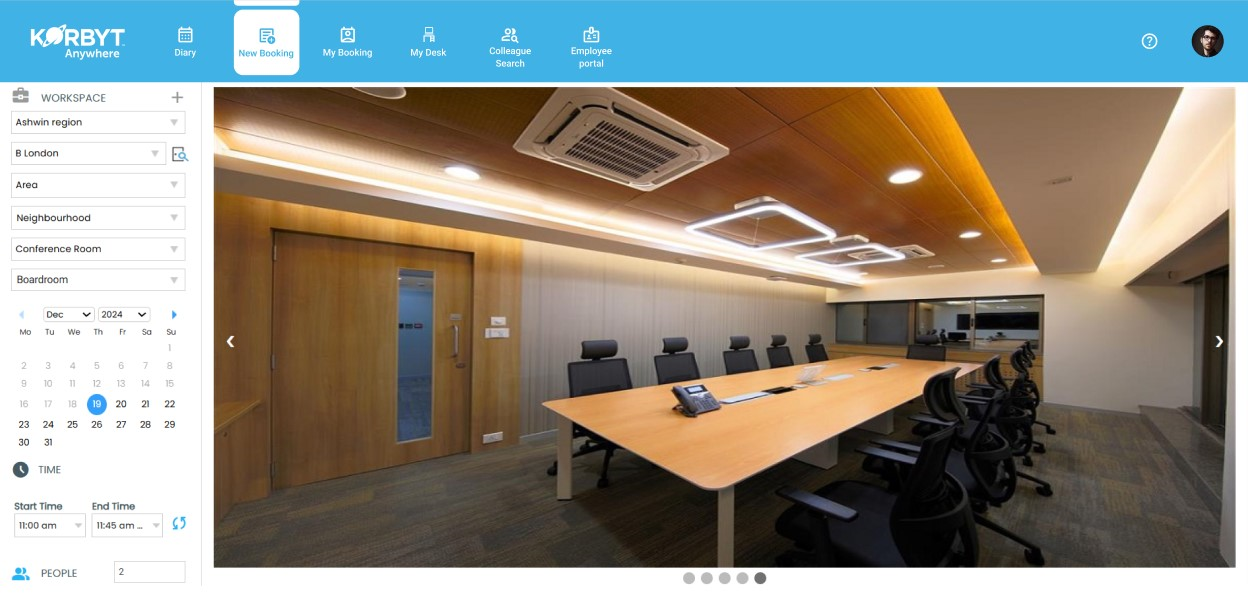
No additional setup required! Just update to the latest version and start optimizing your workplace!
Our Support team should be able to configure Employee Portal during the upgrade, which by default is OFF.
Introducing Virtual Attendee Feature - Smarter, Hybrid Collaboration!
The Virtual Attendee feature is designed to make hybrid meetings smarter and more efficient. With this feature, managing both virtual and in-room attendees have become even easier and more intuitive.
Key Features and Workflow
Easy Toggle for Virtual Attendees: A toggle button in the People section allows users to easily mark attendees as virtual. By default, if the attendee’s primary property matches that of the selected resource, the toggle will be Off, else enabled.
Consistent Virtual Attendee Icon: Once an attendee is marked as virtual, a virtual attendee icon will appear, clearly indicating their status across all screens in the booking journey, ensuring consistency throughout the process.
Automatic Resource Assignment: When attendees are added before selecting a resource, the system will automatically match their primary property with that of the selected resource. If there’s a match, the attendee is assigned to the room; if not, they will be marked as virtual.
Automatic Service Assignment: In Bookit, Room Attendee count will automatically define the count of service items being added to the booking.
Manual Updates: If an attendee is manually marked as virtual or in-room, manual changes will take precedence giving users full control of the booking.
Resource Capacity Restriction: If 'Enforce Max capacity limit' is set to 'Yes' under the BRE Settings, attendees only up to the max capacity of the resource can be associated to a space to ensure there is enough room for the invited attendees and the optimum space is chosen for the booking.
Ensure Optimal Space Utilization: When using Bookit, at least one attendee must be assigned to the room to prevent unused bookings and optimize space allocation. However, Reception teams can override this requirement via the Admin interface, i.e. Korbyt Booking for flexibility.
Encourage Collaboration: If the space added to the booking is collaboration enabled, and there is at-least one virtual attendee added to the booking, the system will remind you to choose the requisite collaboration tool for seamless interaction with all attendees.
Efficient Visitor Management: Internal & External Attendees who are not marked as virtual will be added to the list of Visitors allowing front desk teams to check them into the building offering a holistic workplace experience.

Recommended Settings: To ensure optimum utilization of resources and make the best of the feature, below Location wise settings are recommended:

Enhanced Room Availability Check for Recurrences
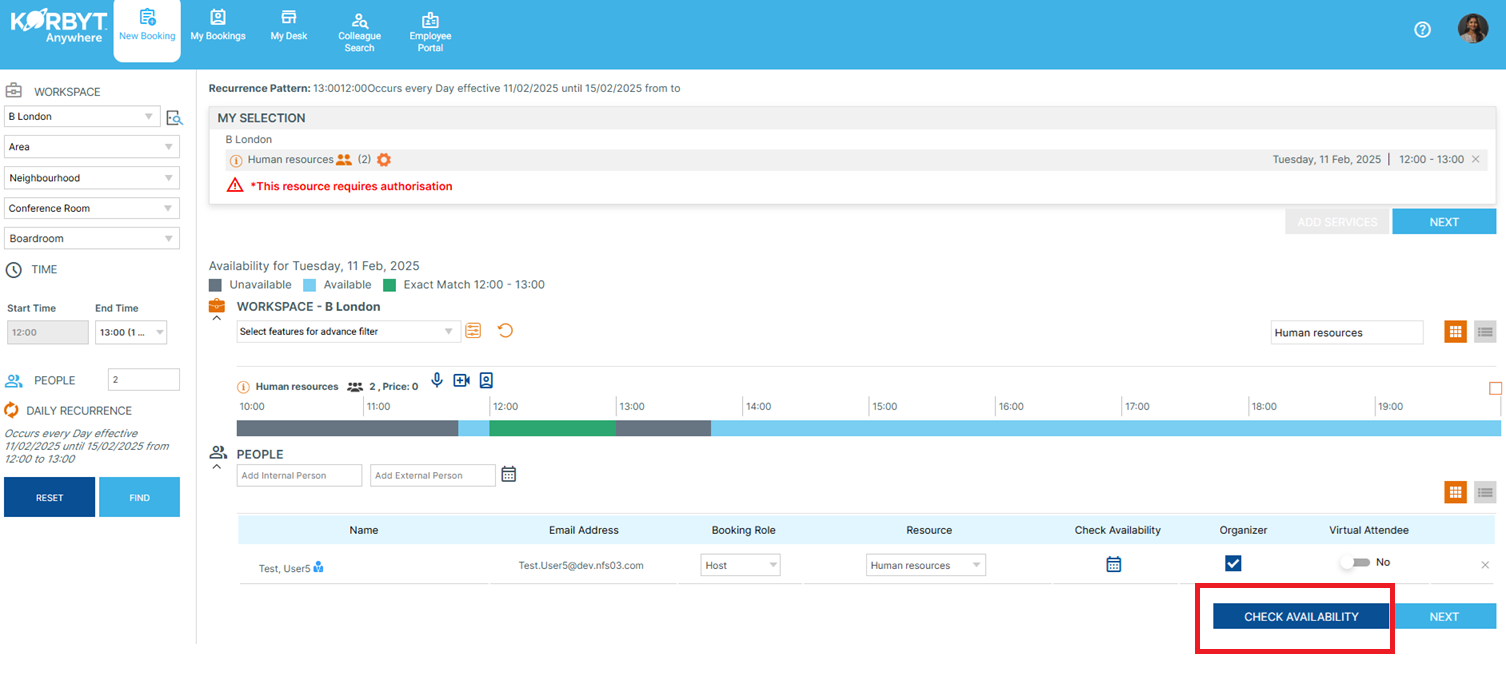
Users can now quickly check room availability before proceeding with the booking. A new "Check Availability" button is added to the Booking form. Clicking it will display unavailable dates for the selected room.
Additional Enhancements
Major UI/UX Enhancements in Outlook Add-in
We have significantly improved the UI/UX of our Outlook Add-in to enhance usability and provide a more seamless booking experience. Key updates include:
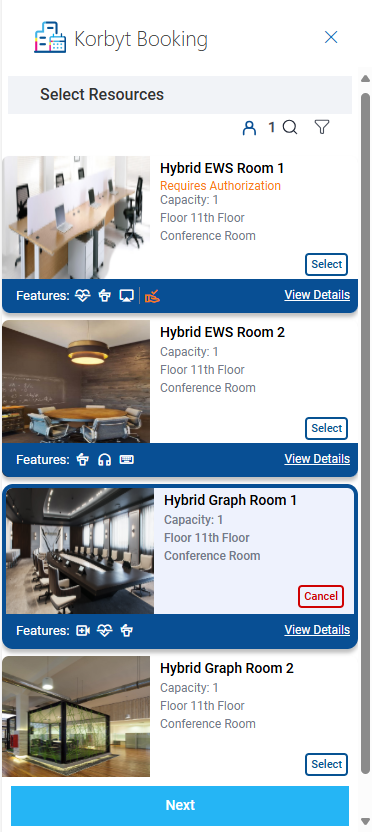
· Room Images for Better Decision-Making: Users can now view room images directly within the Add-in, helping them make more informed and visually guided booking choices.
· Enhanced Font Consistency: The font style across the Add-in has been standardized for a cleaner, more professional look.
· Refined User Interface: Various UI refinements have been made to improve readability, navigation, and overall ease of use.
Spaces requiring authorization will now suggest 'Requires authorization' in orange with an orange icon, ensuring users make an informed decision.
Enhanced Support for Teams Rooms Equipment
We’ve introduced support for Teams Rooms Equipment, ensuring seamless equipment integration when booking spaces via the Add-in.
What’s New?
· When a space is booked using the Add-in, the resource mailbox address associated with that space (under the Mailbox ID field in Resource Management) will automatically be invited.
· In case of an external resource mailboxes, system will be able to automatically update it as VC Equipment.
This enhancement ensures that Teams Rooms Equipment is efficiently managed during bookings, reducing manual updates and improving meeting room coordination.
AI-Driven Alternative Space Assignment
Our new AI-powered feature optimizes space booking by automatically assigning an alternative space that best matches the original selection criteria when a space booking cannot be fulfilled. This feature applies to Single Instance, Recurring Bookings, Multi-Space Bookings, and Multi-Space Recurrences.
AI considers the below when assigning an alternative space
1. Capacity: The alternative must accommodate the same number of people as the originally booked space.
2. Location: The AI ensures the alternative space is within the same location or a comparable one.
3. Floor: The space must be on the same floor, unless no availability exists, in which case it will search nearby floors.
4. Neighborhood: The AI checks for alternatives within the same neighborhood, extending to adjacent neighborhoods if necessary.
5. Resource Type: Only spaces with the same resource type (e.g., meeting rooms, conference spaces) will be considered.
6. Attributes: If space attributes were filtered during the original search, the AI will consider all attributes and seek alternatives accordingly.
7. Collaboration: The AI will also account for collaboration attributes, ensuring the space supports the desired type of collaboration features.
This feature empowers users by leveraging AI to quickly identify the best alternative, ensuring minimal disruption to their scheduling and booking experience.
Key Changes
· The feature is available for Non-Exchange resources only. For Exchange resources, in case of conflict, exchange declines the space and the same is updated in Korbyt Booking.
· Once an alternative is assigned, an instant email will be sent to the user in whose calendar the booking is made.
· For delegate calendars, the email will be sent to both the calendar creator and the calendar owner.
· Location Field Update: If an alternative space is assigned, the location field in the calendar appointment will be updated to reflect the new space details.
· If an alternative is assigned, the VC equipment associated with the original booking will be swapped accordingly.
· No alternative will be assigned if rooms that require authorization are booked.
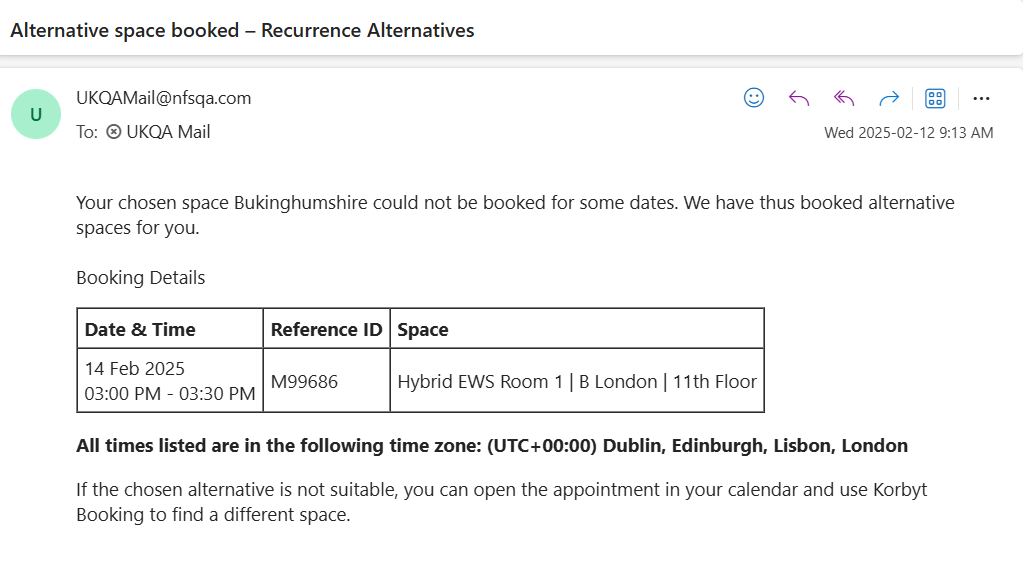
The feature is enabled by default. If you do not wish alternatives to be automatically assigned, the feature can be switched off under: Global Settings>>Exchange Room Sync Settings>>Graph Interface type>> Un-check Enable Automatic Alternatives
Prerequisites
· Office 365 Exchange Administrator rights are required to deploy an add-in.
· Hosted link for Korbyt Booking application V9.0 & above
· Korbyt Booking application must be configured with SSL.
· A valid manifest.xml file that consists of links of Korbyt Booking that will work as Outlook add-in.
· Exchange Add-Ins can take up to 24 hours to show in users add-ins list.
Note: This release does not require a manifest update.
Release Fixes and Changes
Korbyt Booking
Bookit